02. EC2 Basics (Elastic Compute Cloud)
EC2 is a core AWS service providing (IaaS). It allows you to rent virtual servers in the cloud with configurable compute, storage, networking, and security.
📌 EC2 Mainly Consists The Capbility of:
| Feature | Description |
|---|---|
| Renting Virtual Machines | Launch and run EC2 instances with different OS, CPU, RAM, and storage configurations |
| Storage Options | - EBS: Persistent network-attached disks - EFS: Shared storage across instances - Instance Store: Temporary local storage |
| Load Balancing (ELB) | Distribute incoming traffic across multiple instances for high availability |
| Auto-Scaling (ASG) | Automatically scale EC2 instances based on demand |
📌 EC2 Instance Configuration Operations
1. Operating System (OS)
- Linux distributions: Ubuntu, Amazon Linux, Red Hat, etc.
- Windows Server
- MacOS (for development purposes)
2. Compute Power (CPU)
- vCPUs define processing power
- Examples:
t2.micro(small),m5.large(balanced),c6i.xlarge(compute-optimized)
3. Memory (RAM)
- Determines how much data the instance can process in-memory
- Range: 512 MB → several TB depending on instance type
4. Storage
- EBS (Elastic Block Store): Persistent network-attached storage
- EFS (Elastic File System): Shared storage for multiple instances
- EC2 Instance Store: Temporary storage for scratch data
5. Networking and Firewall
- Network card speed and bandwidth
- Public and private IP addresses
- Security Groups: Firewall rules controlling inbound/outbound traffic
6. Bootstrap Scripts (User Data)
- Scripts that run automatically on first launch
- Used for installing software, configuring systems, joining clusters, etc.
📌 EC2 Lifecycle
- Launch Instance: Choose AMI, instance type, storage, and networking
- Run Instance: Connect via SSH (Linux) or RDP (Windows)
- Scale: Add/remove instances via Auto Scaling Groups (ASG)
- Terminate: Stop or terminate to save costs
⚙️ EC2 Architecture
Amazon EC2 (Elastic Compute Cloud) provides scalable virtual servers in the AWS Cloud.
It allows you to choose compute, storage, and networking configurations with full control over your instances.
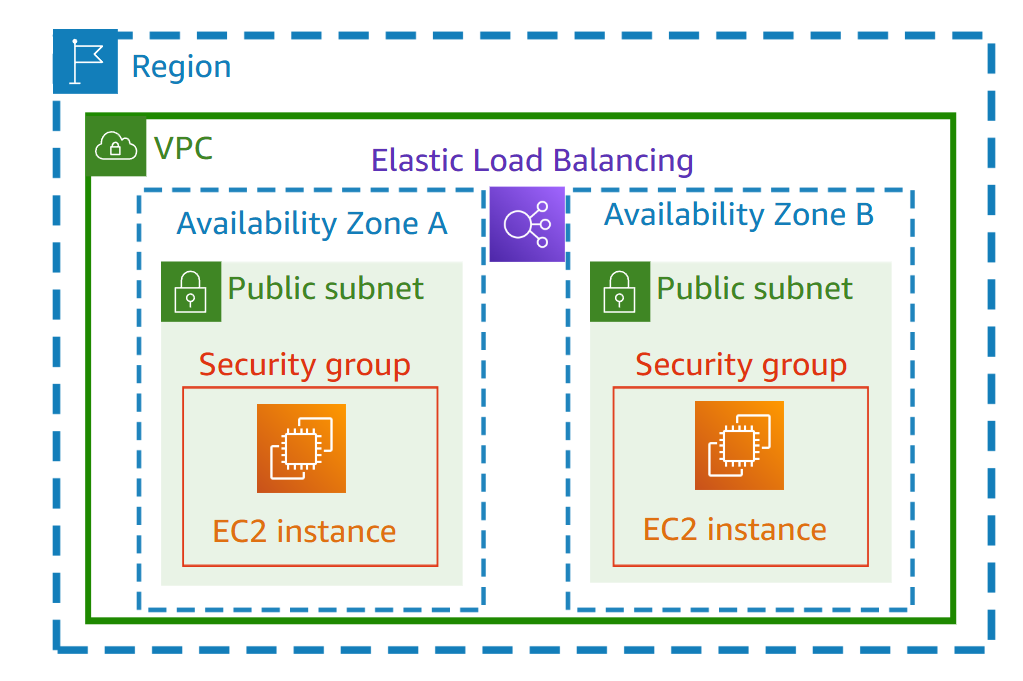
🧭 EC2 Architecture Components
| Component | Scope | Can Span AZs? | Purpose | Example |
|---|---|---|---|---|
| Region | Global area | — | Physical AWS location | ap-south-1 (Mumbai) |
| VPC (Virtual Private Cloud) | Region | ✅ Yes | Private network inside AWS | 172.31.0.0/16 |
| Subnet | Availability Zone | ❌ No | Logical subdivision of VPC | 172.31.0.0/20 |
| Internet Gateway (IGW) | VPC | ✅ Yes | Enables Internet access for public subnets | Connected to VPC |
| Security Group (SG) | VPC | ✅ Yes | Virtual firewall for EC2 | WebServerSG |
| EC2 Instance | Subnet (AZ) | ❌ No | Virtual machine in AWS | Web or App Server |
🧩 Explanation of Each Term
- Region: Physical AWS location (e.g., Mumbai, N. Virginia). Contains multiple Availability Zones (AZs).
- VPC (Virtual Private Cloud): Your private, isolated network inside AWS. Like your own cloud-based data center.
- Subnet: A smaller network inside your VPC — each subnet lives in one AZ. Can be public or private. It's a range of IP address.
- Internet Gateway (IGW): A bridge that allows resources in a public subnet to access the Internet.
- Security Group (SG): A firewall for your EC2 instance that allows/blocks specific inbound and outbound traffic.
- EC2 Instance: The actual virtual server (Linux/Windows) running inside your subnet.
🌐 Subnet Types
| Type | Internet Access | Route Table Destination | Used For |
|---|---|---|---|
| Public Subnet | ✅ Yes | 0.0.0.0/0 → Internet Gateway | Web servers, bastion hosts |
| Private Subnet | ❌ No | 0.0.0.0/0 → NAT Gateway | Databases, backend servers |
🔐 Security Group Example
| Type | Protocol | Port | Source | Purpose |
|---|---|---|---|---|
| Inbound | TCP | 22 | Your IP | SSH access (Linux) |
| Inbound | TCP | 80 | 0.0.0.0/0 | HTTP (public access) |
| Outbound | All | All | 0.0.0.0/0 | Allow all outbound traffic |
🖥️ EC2 User Data
EC2 User Data allows you to bootstrap your instances by automatically running a script when an instance launches for the first time.
Bootstrapping means executing commands during the machine’s initial startup.
⚙️ Common Use Cases
EC2 User Data scripts are typically used to automate tasks such as:
- Installing system updates and security patches
- Installing software packages
- Downloading files from the internet
- Configuring system or application settings
- Any other custom startup tasks
- Scripts execute once at first boot.
- Run with root privileges, so they can perform administrative tasks.
- Can be used for any bootstrapping automation needed for your EC2 instances.
This ensures your instances are ready to use immediately after launch, without manual intervention.
✒️ User Data Script
#!/bin/bash
# Update packages
yum update -yAAAAAAAA

# Install Apache HTTP server
yum install -y httpd

# Start and enable the service
systemctl start httpd
systemctl enable httpd

# Create a simple index.html page
echo "<h1>Hello World from $(hostname -f)</h1>" > /var/www/html/index.html
Note: User Data scripts run only once at the instance's first start and execute with root privileges.