Other Services
1. AWS WorkSpace
-
It's a Desktop-as-a-Service which is used to provision secure Window or Linux VM in AWS cloud.
-
It replaces traditional on-premises VDI (Virtual Desktop Infrastructure), no need to manage physical server, storage, or desktop env.
-
User can connect to workspace via their own devices.
-
Billing is pay as you go.
-
Can easily scale to thousands of desktops across multiple users or departments.
-
Integrated with AWS KMS, VPC, and IAM for encryption and access control or even AD.
🔹 Problem Scenario
Latency is critical for a good user experience.
Since Amazon WorkSpaces provides interactive desktops, high latency can make them feel slow or laggy.
Problem: A company has:
| Location | Description |
|---|---|
| 🏢 California (US) | Office #1 |
| 🏢 Paris (France) | Office #2 |
All WorkSpaces are deployed in the US region.
As a result, Paris users experience high latency, since their virtual desktops are hosted thousands of miles away.
Solution: Deploy WorkSpaces in multiple AWS Regions, close to your users.
2. Amazon AppStream 2.0
-
Used to stream individual app.
-
Amazon AppStream 2.0 is a fully managed application streaming service that lets you deliver desktop applications to users via a web browser, without needing to deploy or manage underlying infrastructure.
Example: We can use blender in our brower through AppStream.
-
Allow to configure an instance type per application tpye (CPU, RAM, GPU)
-
AppStream is for a paritcular desktop app while Workspace for full desktop.
-
It does not have always on option.
3. IOT Core
-
IOT stands for "Internet of Things" - the network of inter connected devices that are able to collect and transfer data.
-
IOT core allow us to easily connect IOT devices to the aws cloud.
-
Integrate with IOT services (Lambda, S3, SageMaker etc)
-
Applicatons can comm with devices even when they are not connected.
4. AWS AppSync
-
AWS AppSync is a fully managed service that helps you build scalable, real-time GraphQL APIs for your mobile and web applications.
-
It allows apps to store, query, and synchronize data across multiple sources (like DynamoDB, Lambda, or HTTP APIs) — with real-time updates and offline access built in.
-
It leverages AWS Amplify.
5. AWS Amplify
-
AWS Amplify is a set of tools and services that helps developers build, deploy, and manage scalable full-stack web and mobile applications quickly — without deep AWS expertise.
-
It’s essentially a developer-friendly wrapper around many AWS services like AppSync, API Gateway, Lambda, Cognito, S3, and DynamoDB.
-
Used to Build and host apps with integrated authentication and APIs.
-
AWS Amplify is a developer framework that can automatically generate and manage AppSync backends.
6. AWS Infrasturcture Composer
-
AWS Infrastructure Composer is a visual tool that lets you design, build, and visualize serverless applications and their architecture using a drag-and-drop interface.
-
It automatically generates Infrastructure as Code (IaC) — compatible with AWS CloudFormation and AWS SAM (Serverless Application Model).
Purpose: To make it easier for developers — even without IaC expertise — to quickly design, connect, and configure AWS resources visually and export them as deployable templates.
7. AWS Device Farm
-
AWS Device Farm is a fully managed application testing service that lets you test your mobile and web applications on real devices not emulators hosted in the AWS Cloud.
-
It helps developers ensure their apps work correctly across a wide range of devices, browsers, and operating systems.
-
Test against actual physical Android, iOS devices, and desktop browsers hosted by AWS.
-
Supports both automated test scripts and manual (remote) interactions.
-
Integration with CI/CD
8. AWS Backup
-
AWS Backup is a fully managed, centralized backup service that helps you automate and manage backups across multiple AWS services. It provides on-demand and scheduled backups, point-in-time recovery (PITR), and lifecycle management for retention and archival.
-
Supported Services: EC2, EBS, RDS/Aurora, Dynamo DB, EFS, FSx, Sotrage Gateway
-
All backup data is stored in S3.
-
On demand and Scheduled backups.
-
Support PITR(Point in time recovery)
-
Cross region backups.
-
Tracking with Cloudtrail.
9. Disaster Recovery Strategies
-
Disaster Recovery (DR) is about preparing for and recovering from unexpected events (like outages, data loss, or region failures) to ensure business continuity.
-
It refers to how quickly and effectively your systems can recover after a disaster such as hardware failure, natural disaster, or human error — with minimal downtime and data loss.
-
AWS offers several DR strategies that differ in cost, complexity, and recovery time
A. Backup and Restore (💰 Cheapest)
-
Regularly back up data and configuration to AWS. Restore when disaster occurs.
-
No running infrastructure, backups only.
-
Recovery time is long.
B. Pilot Light (💰💰 Low)
-
Pilot Light is an AWS Disaster Recovery (DR) strategy that keeps critical core components of system always running in AWS, while the rest of env can be quickly launched when a disaster occurs.
-
Recovery time is moderate.
-
Only essential services (like databases, authentication, core infrastructure) are always on in AWS.
-
Other non-critical components (like web/app servers, load balancers, etc.) are off and can be started from AMIs, snapshots, or templates when disaster strikes.
-
This results in faster recovery than Backup & Restore, but cheaper than Warm Standby.
C. Warm Standby (💰💰💰 Medium)
-
Warm Standby is an AWS Disaster Recovery (DR) strategy where a scaled-down but fully functional copy of your production environment is always running in another AWS Region.
-
So, unlike Pilot Light (where only core systems are active), in Warm Standby, the entire system runs in DR, but with smaller capacity
-
When a disaster occurs, you scale up this environment quickly to handle the full production load.
-
Recovery time is Short (minutes to hours)
-
It is kept up to date through data replication.
-Normally, it runs at reduced capacity to save costs, During a disaster, it’s scaled up to full capacity to take over production operations.
D. Multi-Site (Active-Active) (💰💰💰💰 High)
-
Multi-Site (Hot Site) also known as Active-Active is the highest availability and fastest recovery AWS DR strategy.
-
In this approach, your application runs simultaneously in two (or more) AWS Regions. If one region fails, traffic is instantly redirected to the other without downtime.
-
Both sites (primary and DR) are always active, fully synchronized, and serving production traffic.
-
Failover is automatic, almost instant, with minimal disruption.
10. AWS Elasitc Recovery (DRS)
-
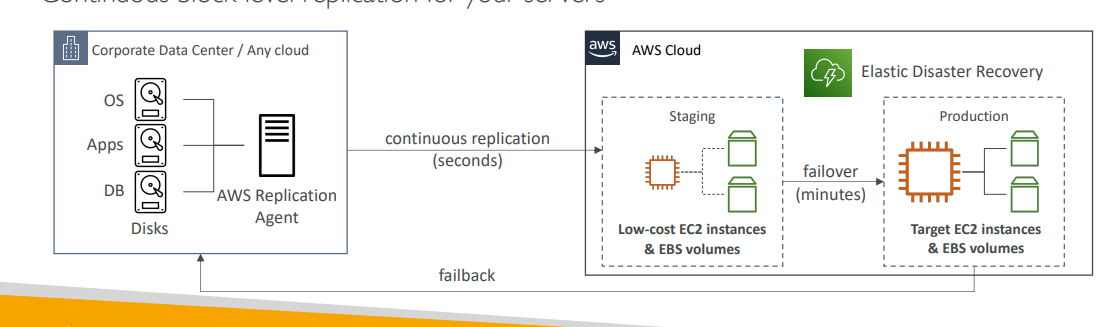
AWS Elastic Disaster Recovery (DRS) is a fully managed service that helps you quickly and easily recover your on-premises, virtual, or cloud-based servers into AWS in case of a disaster.
-
We do continuous block-level replciation of our data center.
-
It performed through AWS replication agent which do continous replcation into a stagin env.
-
When a disater occur this staging area is coverted to production and after distater failback occur for normal ops.
11. AWS DataSync
-
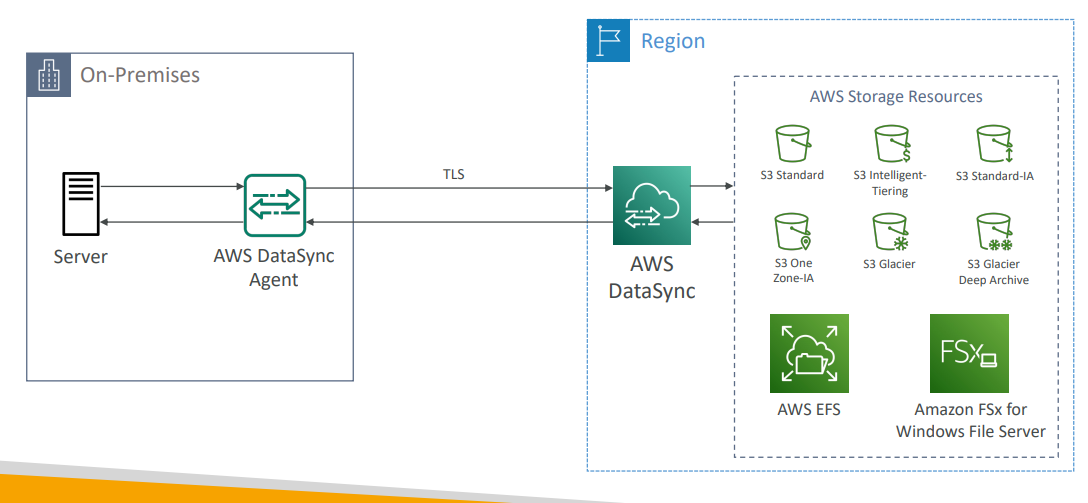
AWS DataSync is a fully managed data transfer service used to move large amounts of data between on-premises storage and AWS storage services.
-
Supported destination are S3, EFS, FSx
-
We install a DataSync agent on-premises.
-
Uses TLS and IAM roles for auth.
-
It does incremental data transfer that is after first full load, all future transfers are incremental (only chaged data is sent).
-
Replication tasks can be schduled hourly, daily, weekly.
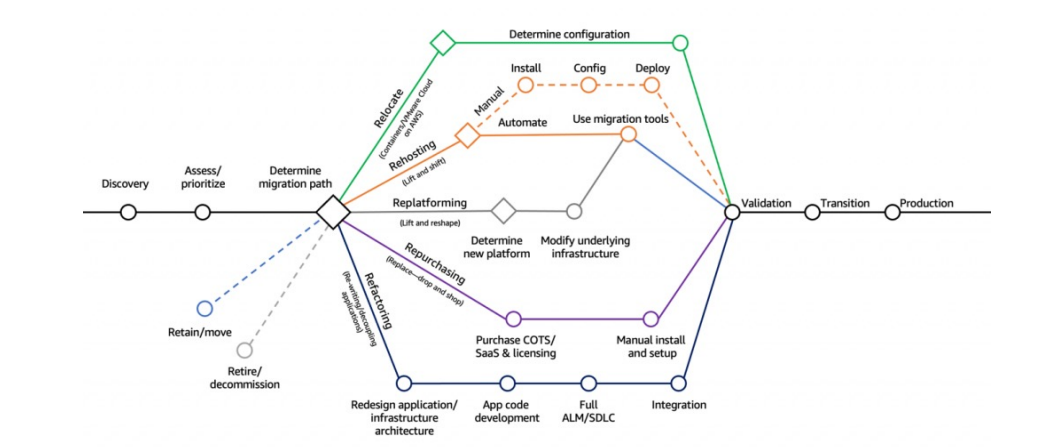
12. Cloud Migration Strategies: The 7Rs
1. Retire
Turn off applications that are no longer needed.
This reduces cost, simplifies your environment, and minimizes your attack surface.
Typically, 10–20% of applications can be retired before migration.
2. Retain
Keep certain applications on-premises instead of migrating.
Reasons for retention include:
- Security or data compliance requirements
- Performance or latency needs
- Unresolved dependencies
- Lack of business value in migrating
Retain is still a valid migration decision in your overall cloud strategy.
3. Relocate
Move existing workloads as-is to AWS Cloud version of it.
Example:
- Migrate VMware-based workloads from on-premises to VMware Cloud on AWS.
This approach keeps the same infrastructure and tools but runs in the AWS environment.
4. Rehost (Lift and Shift)
Migrate applications to AWS without code or architecture changes. (Rehosting)
Example:
- Move on-premises applications or databases directly to Amazon EC2.
This is the simplest and fastest way to migrate and can reduce costs by up to 30%.
Use services like AWS Application Migration Service to perform lift-and-shift migrations.
5. Replatform (Lift and Reshape)
Make small optimizations during migration to leverage AWS managed services. Making arch changes. Example:
- Move databases to Amazon RDS
- Move applications to Elastic Beanstalk
Core architecture remains the same, but you gain cloud benefits like:
- Automated backups
- High availability
- Reduced operational overhead
6. Repurchase (Drop and Shop)
Replace existing applications with cloud-based SaaS (Software as a Service) offerings.
Examples:
- CRM → Salesforce
- HR → Workday
- CMS → Drupal Cloud
This strategy offers quick deployment and reduces maintenance but may involve short-term costs.
7. Refactor / Re-architect
Re-imagine and redesign your application to be cloud-native.
Motivations include:
- Improved scalability
- Enhanced performance
- Better security and agility
Examples:
- Break a monolith into microservices
- Use serverless architectures (AWS Lambda, Amazon S3, DynamoDB)
This approach requires the most effort but delivers the greatest long-term value.
Summary
The 7 R’s help you determine the best migration path for each workload:
Retire → Retain → Relocate → Rehost → Replatform → Repurchase → Refactor
Each represents a different level of transformation effort and cloud adoption benefit.
13. Application Discovery Service and Applcation Migartion Service
When moving to the cloud, there are two possible paths:
-
Start Fresh (Cloud-Native) — Build directly on AWS without migrating existing infrastructure.
-
Migrate Existing Workloads — Move on-premises servers and applications to AWS.
A. AWS Application Discovery Service (ADS)
- Helps you plan your migration by discovering and analyzing on-premises infrastructure.
- It gather detailed server utilization and dependency data before migration and does mapping
Types of Discovery
1. Agentless Discovery (via Connector)
-
Collects info from virtual machines (VMs)
-
Provides configuration and performance history (CPU, memory, disk)
2. Agent-Based Discovery (via Discovery Agent)
-
Installed on individual servers
-
Captures system configuration, running processes, and network connections
-
Useful for dependency mapping
This all data will be viewed by AWS Migration Hub
B. AWS Migration Service (MGN)
-
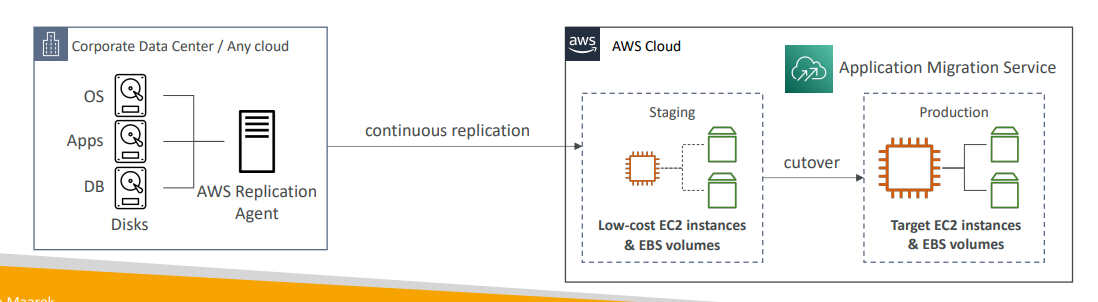
Uses lift and shift (rehost) solution to migarte app to AWS.
-
Covert phycical infra to cloud native services.
-
Centralized dashboard to track discovery, migration progress, and status.
-
Integrates with ADS and MGN for end-to-end visibility.
14. AWS Migration Evaluator
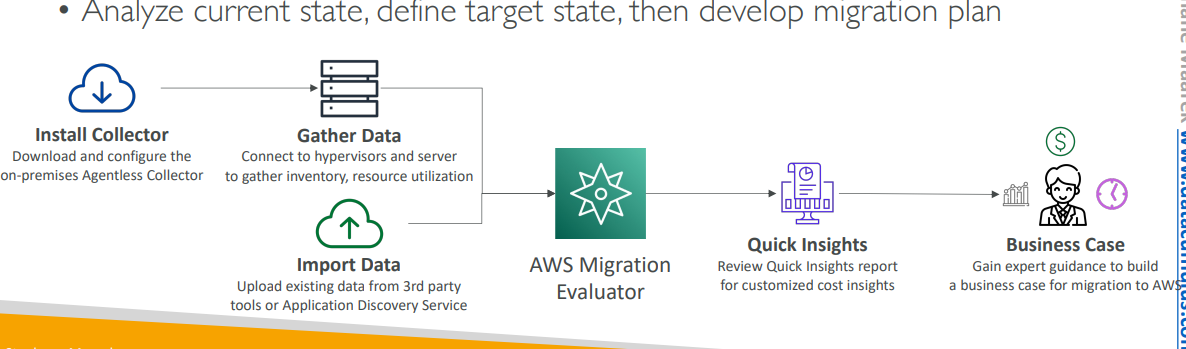
-
Help build a data driven business case for migartion to AWS.
-
Provide clear baseline of what org is running today.
-
Install agentless collector to conduct broad-based discovery
-
Take snapshot of on premises foot print.
-
Analyze current state, define target state,and then develop migration plan.
15. AWS Migration Hub
-
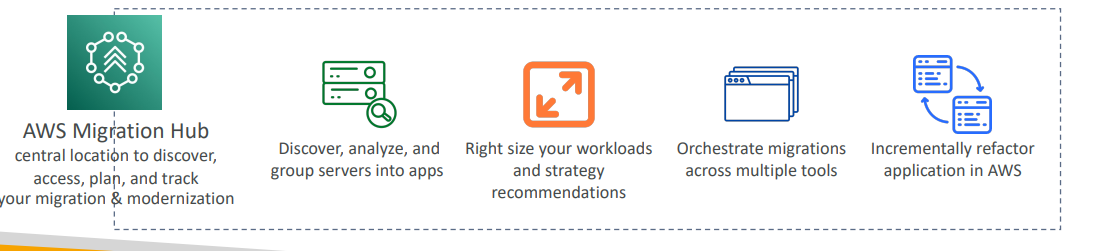
Central location to collect servers and applications inventory data for the assessment, planning, and tracking of migrations to AWS
-
Helps accelerate your migration to AWS, automate lift-and-shift
-
AWS Migration Hub Orchestrator – provides pre-built templates to save time and effort migrating enterprise apps
-
Supports migrations status updates from Application Migration Service (MGN) and Database Migration Service (DMS)
16. AWS Fault Injection Simulator(FIS)
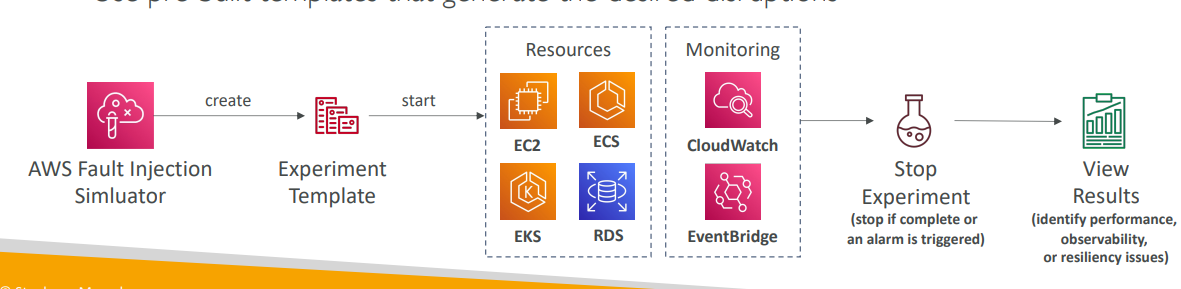
A fully managed service for running fault injection experiments on AWS workloads
• Based on Chaos Engineering – stressing an application by creating disruptive events (e.g., sudden increase in CPU or memory), observing how the system responds, and implementing improvements
• Helps you uncover hidden bugs and performance bottlenecks
• Supports the following AWS services: EC2, ECS, EKS, RDS…
• Use pre-built templates that generate the desired disruptions
17. AWS Step Functions
-
Build a serverless visual workflow to orchestrate lambda functions.
-
It features sequence, parallel, condtions, erorr handling, timeout etc.
-
Can intergrate with Ec2, ECs, On-premiss, API Gateway, SQS
-
Possible to build any workflow .
18. AWS Ground Station
-
Fully managed service that let you control satellite comms, process and scale your satelite operation.
-
Allow to download satellite data to AWS VPC,
-
Use Case; Weather forecase, video brodecaste.
-
It provides a global network of satellite ground station near AWS regions.
19. AWS Pinpoint
-
Scalable 2-way (outbound/inbound) marekting communcation service.
-
Supports email, SMS, push, voice and in-app messaging.
-
Ablity to customize message.
-
Scales to billion of messages per day.
-
Use case: Run campagins.
-
In SNS or SES we manage each message audience content and delviery schdule.
-
In pinpoint we create message template and devliery schedule and full campigans.