04. Amazon EFS
Amazon EFS (Elastic File System) is a fully managed, scalable, shared network file system (NFS) that can be mounted simultaneously on hundreds of Linux EC2 instances even across multiple Availability Zones (AZs).
It provides shared file access, automatic scaling, and high availability, making it ideal for workloads where multiple instances need access to the same data at the same time.
| Feature | Description |
|---|---|
| Type | Managed Network File System (NFS) |
| Accessibility | Mount on 100s of EC2 instances(Linux Only) |
| Persistence | Data remains even if EC2 stops/terminates |
| AZ Scope | Multi-AZ, highly available |
| Use Cases | Web servers, CMS, shared storage, container workloads |
| Cost | Pay per use, no capacity planning |
⚙️ How It Works
EFS is mounted over the network using the NFSv4 protocol.
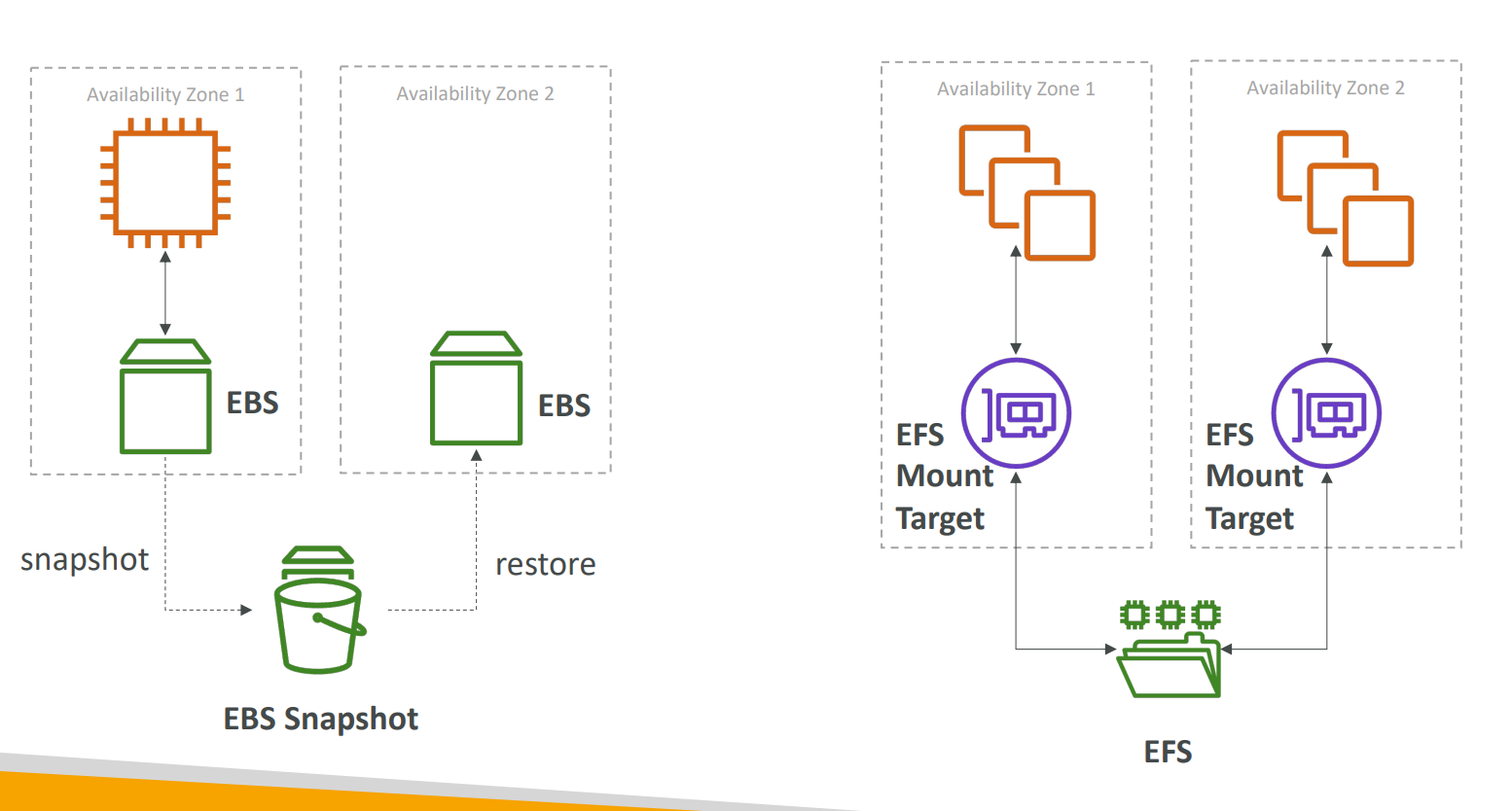
Each EC2 instance connects to an EFS Mount Target within its Availability Zone.
You can think of it as a shared drive that multiple Linux instances can read/write to concurrently.
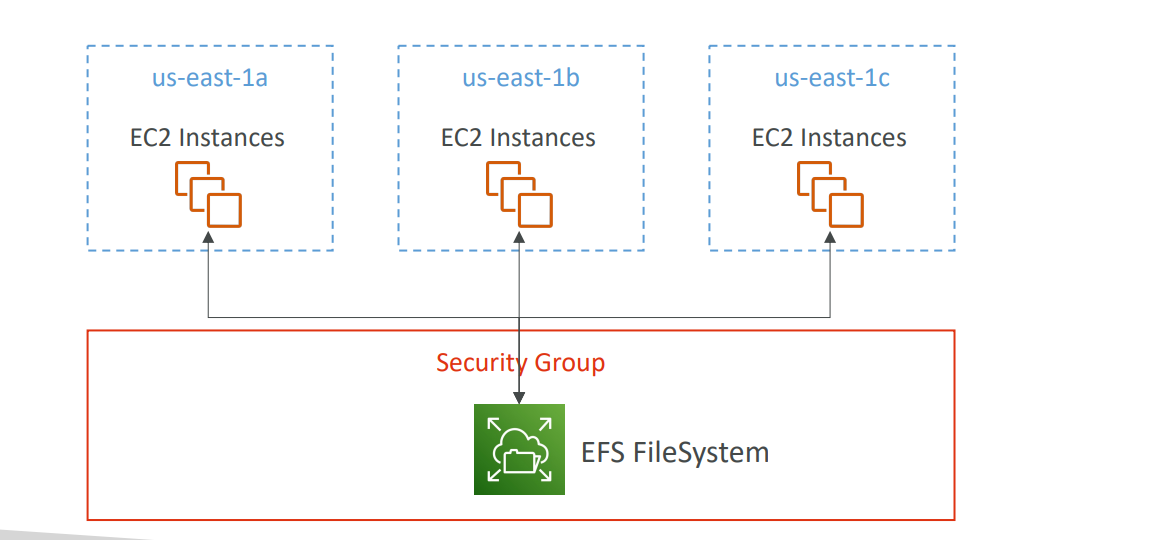
💡 Each AZ connects through its mount target, ensuring high performance and redundancy.
🔁 Comparison: EBS vs EFS
| Feature | EBS (Elastic Block Store) | EFS (Elastic File System) |
|---|---|---|
| Attachment | One instance per AZ | Many instances across AZs |
| Scope | Single AZ | Multi-AZ |
| Performance | High | Scalable, elastic throughput |
| Durability | Persistent | Persistent |
| Protocol | Block storage | NFS (file system) |
| Use Case | Databases, single-instance apps | Shared content, multi-instance workloads |
💡 EFS Storage Classes
EFS offers two main storage classes:
| Storage Class | Description | Cost | Ideal Use |
|---|---|---|---|
| EFS Standard | Frequently accessed files | 💰 Higher | Active workloads |
| EFS Infrequent Access (EFS-IA) | Files not accessed often | 💸 Up to 92% cheaper | Archival / cold data |
🔄 Lifecycle Management
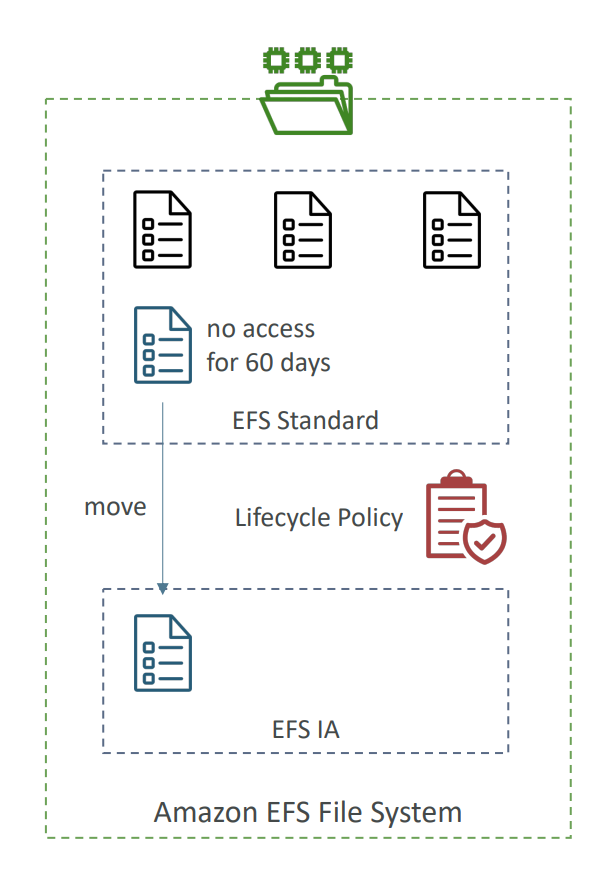
EFS can automatically move files between these two storage classes based on access patterns.
Example:
- You define a Lifecycle Policy: move files to EFS-IA after 60 days of no access.
- If the file is accessed again → EFS automatically brings it back to EFS Standard.
This transition is automatic and transparent to your applications —
your code doesn’t need to change or know where the file resides.
🧠 Use Cases
| Scenario | Why EFS Fits |
|---|---|
| Web server farms | Multiple EC2s share same web content |
| Content Management Systems (CMS) | Centralized file storage across many nodes |
| Big Data / Analytics | Shared access to large datasets |
| Container workloads (ECS / EKS) | Persistent shared volumes for containers |
| Machine Learning training | Distributed data sharing among nodes |
⚠️ Limitations
- ❌ Works only with Linux EC2 instances (not Windows)
- 💸 More expensive than EBS (approx. 3× gp2 pricing)
- 📡 Requires network connectivity (since it’s NFS-based)
🧾 Summary
| Feature | EBS | Instance Store | EFS |
|---|---|---|---|
| Storage Type | Network-attached block | Local hardware disk | Network file system (NFS) |
| Persistence | Persistent | Ephemeral | Persistent |
| Multi-AZ Access | ❌ No | ❌ No | ✅ Yes |
| Shared Access | ❌ One instance | ❌ No | ✅ Many instances |
| Cost | Moderate | Free (included) | High (pay per GB used) |
| Ideal Use | Databases, OS disks | Caching, temp data | Shared storage for multiple EC2s |
🧠 Key Exam Tip
Whenever you see:
“Shared file system accessible by multiple Linux EC2 instances across AZs”
➡️ Think Amazon EFS.