05. Amazon FSx
Amazon FSx is a fully managed AWS service that lets you launch and use third-party high-performance file systems within the AWS Cloud — without needing to manually install, patch, or maintain them.
It’s ideal when you don’t want to use EBS, EFS, or S3, and instead need specialized file systems for:
- Windows workloads (NTFS + SMB)
- High-Performance Computing (HPC)
- Enterprise data management (NetApp ONTAP)
| File System | Optimized For | Developed By | OS |
|---|---|---|---|
| FSx for Windows File Server | Windows-native file sharing | Microsoft | Windows |
| FSx for Lustre | High-performance computing (HPC) | Lustre (Open Source) | Linux |
| FSx for NetApp ONTAP | Enterprise storage and replication | NetApp | Linux / Windows |
🪟 Amazon FSx for Windows File Server
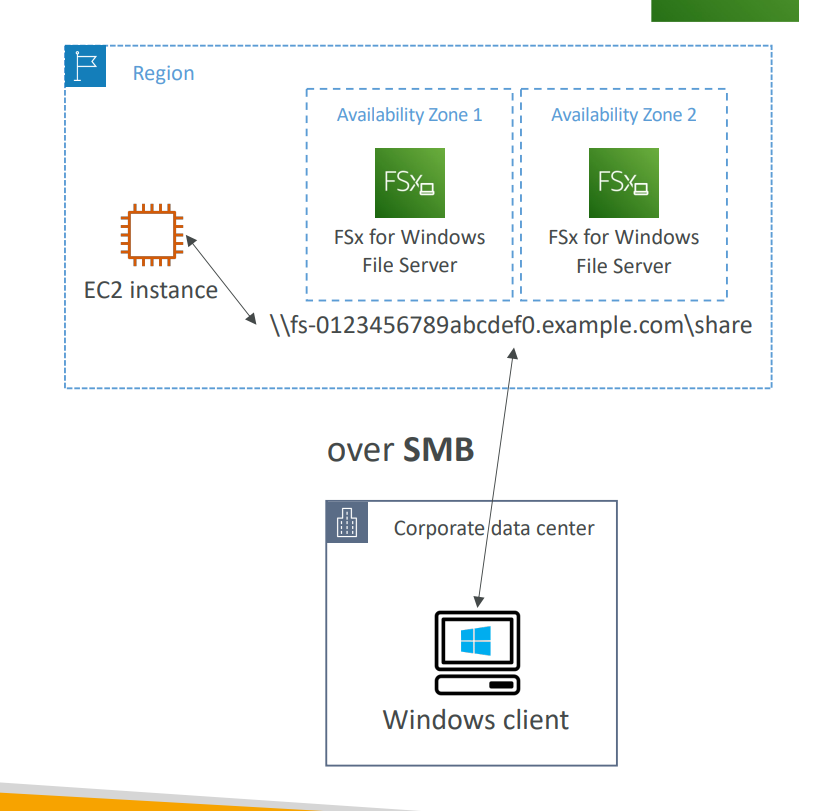
A fully managed, highly reliable, and scalable Windows-native shared file system built on Microsoft Windows File Server.
| Feature | Description |
|---|---|
| Protocol | SMB (Server Message Block) |
| File System | NTFS (New Technology File System) |
| Integration | Microsoft Active Directory (AD) |
| Access | From AWS or on-premises (via SMB) |
| Architecture | Typically deployed across 2 Availability Zones for HA |
🧠 Use Cases
- Shared storage for Windows EC2 instances
- Corporate file shares for users or departments
- On-premise + AWS hybrid file access
- Lift-and-shift of existing Windows file servers to AWS
⚡ Amazon FSx for Lustre
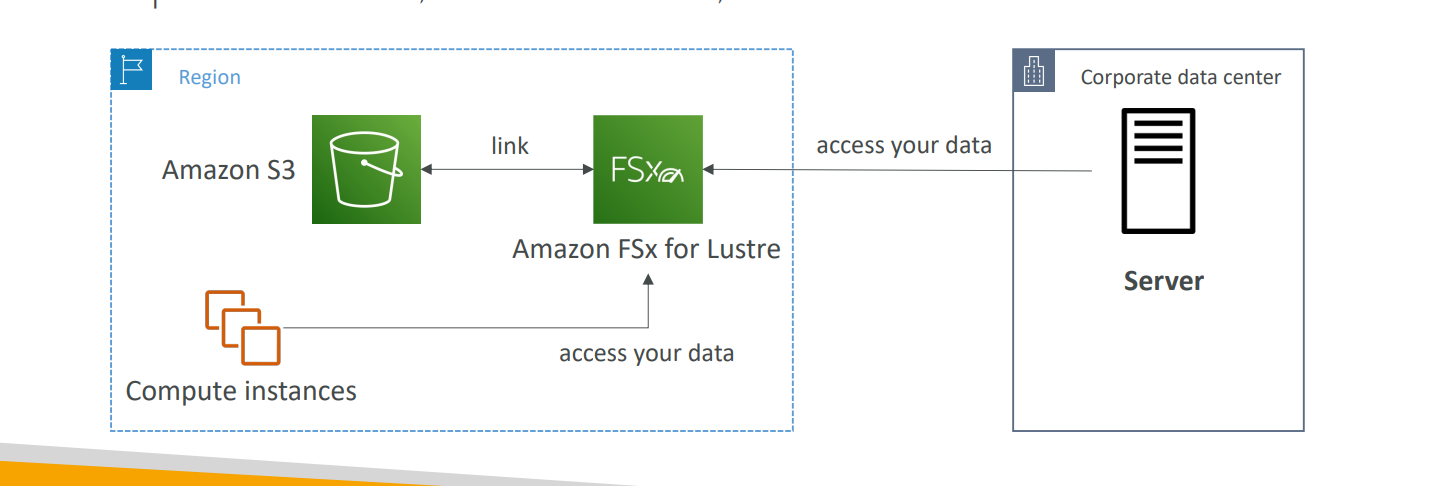
A fully managed, high-performance, and scalable file system built for High-Performance Computing (HPC) workloads.
🧩 “Lustre” = Linux + Cluster — designed for parallel, high-speed access to large datasets.
| Feature | Description |
|---|---|
| Designed For | Machine Learning, Big Data, Analytics, Financial Modeling, Video Rendering |
| Performance | 100s of GB/s throughput, millions of IOPS, sub-ms latency |
| Integration | Can link directly with Amazon S3 (process S3 data at HPC speed) |
| Access | From EC2 instances or on-prem HPC clusters |
🧠 Use Cases
- Machine Learning / AI Training
- Data Analytics / Financial Simulations
- Video Rendering & Media Processing
- Scientific or Research HPC workloads
🧠 Summary Comparison
| Feature | FSx for Windows | FSx for Lustre | FSx for NetApp ONTAP |
|---|---|---|---|
| Developer | Microsoft | Lustre (Open Source) | NetApp |
| Optimized For | Windows file shares | HPC, ML, analytics | Enterprise data management |
| Protocol | SMB | Lustre | NFS / SMB / iSCSI |
| File System | NTFS | Lustre | ONTAP |
| OS Support | Windows | Linux | Linux / Windows |
| Integration | Active Directory | Amazon S3 | Snapshots, replication, tiering |
🧾 Key Takeaways
- Amazon FSx = Managed third-party file systems (Microsoft, Lustre, NetApp, etc.)
- FSx for Windows = Windows-native (NTFS + SMB + AD)
- FSx for Lustre = HPC performance + S3 integration
- FSx for NetApp ONTAP = Enterprise-grade data management
- Designed for workloads that need specialized performance, compatibility, or protocols beyond EBS/EFS/S3.
🧠 Exam Tip
Whenever you see:
“Managed file system using SMB and NTFS” → FSx for Windows File Server
“File system for HPC, ML, or S3-linked analytics” → FSx for Lustre
“Enterprise data management, replication, or tiering” → FSx for NetApp ONTAP
➡️ Think Amazon FSx!