05. Amazon S3 Versioning
Versioning in Amazon S3 allows you to preserve, retrieve, and restore every version of every object stored in your bucket. It’s a bucket-level feature that protects data from accidental overwrites or deletions.
⚙️ Enable Versioning
Versioning is disabled by default and must be explicitly enabled.
Steps:
- Go to your S3 bucket → Properties tab.
- Scroll to Bucket Versioning.
- Click Edit → Enable → Save changes.
Once enabled:
- Every object upload creates a unique version ID.
- Re-uploading the same key (file name) generates a new version instead of overwriting.

📄 Object Versioning Behavior
| Action | Result |
|---|---|
| Upload a file before enabling versioning | Version ID = null |
| Upload the same file after enabling versioning | New version created with unique version ID |
| Suspend versioning | Stops new versions but retains existing ones |
| Delete versioned object (normal delete) | Adds a delete marker (doesn’t remove actual data) |
| Permanently delete version | Removes that version irreversibly |
🧩 Example Scenario
- Upload
index.html→ content: "I love coffee"
→ Version ID:null - Enable versioning → upload again with content: "I REALLY love coffee"
→ New Version ID generated. - Viewing versions via “Show versions” reveals both versions.
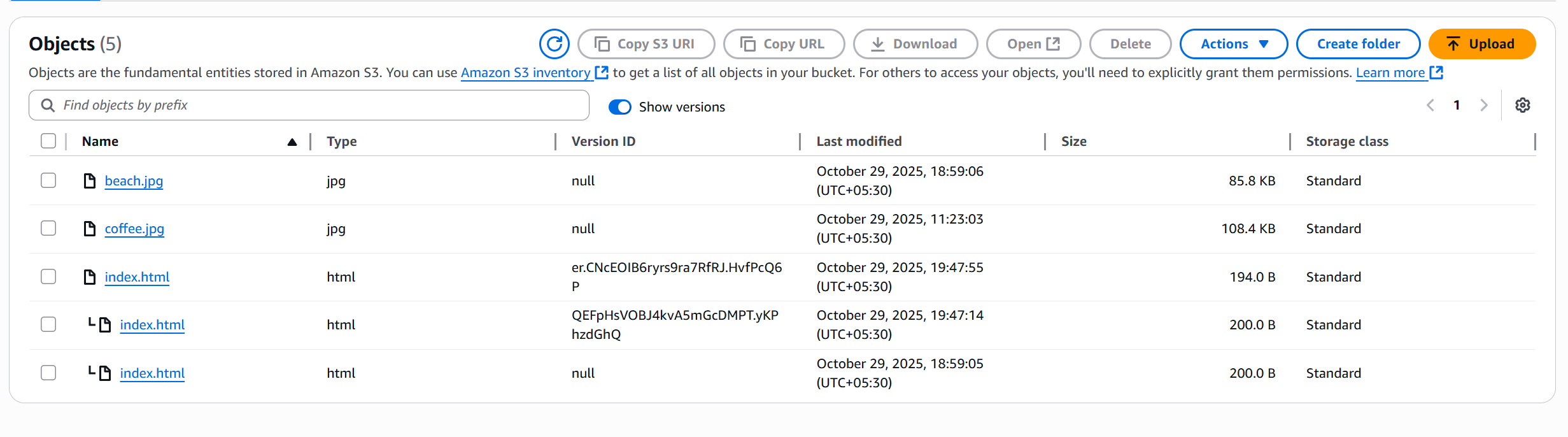
♻️ Rollback to Previous Version
To restore an older version:
- Enable “Show versions”.
- Locate the earlier version ID.
- Delete the latest version (permanent delete).
- Object automatically reverts to the previous version.
🚫 Delete Markers Explained
When versioning is enabled:
- Deleting an object does not remove data — it creates a delete marker.
- The object appears deleted in the console, but older versions remain.
- To delete object with delete marker ensure Show versions is disabled.
To restore:
- Enable “Show versions”.
- Find and delete the delete marker (permanent delete).
- The previous version becomes active again.
🧠 Key Points to Remember
| Concept | Description |
|---|---|
| Protection | Safeguards against accidental deletes or overwrites |
| Rollback | Allows reverting to any previous state |
| Null Version | Assigned to files uploaded before versioning |
| Suspend Safe | Suspending versioning doesn’t delete old versions |
| Delete Marker | Logical deletion without data loss |
💡 Best Practices
- Always enable versioning for production buckets.
- Use Lifecycle Policies to automatically clean up old versions to save storage costs.
- Avoid manual permanent deletes unless necessary.