06. API Gateway
01. Amazon API Gateway
Amazon API Gateway is a fully managed AWS service that enables developers to create, publish, maintain, monitor, and secure APIs at any scale.
It acts as a front door for applications to access data, business logic, or functionality from your backend services.
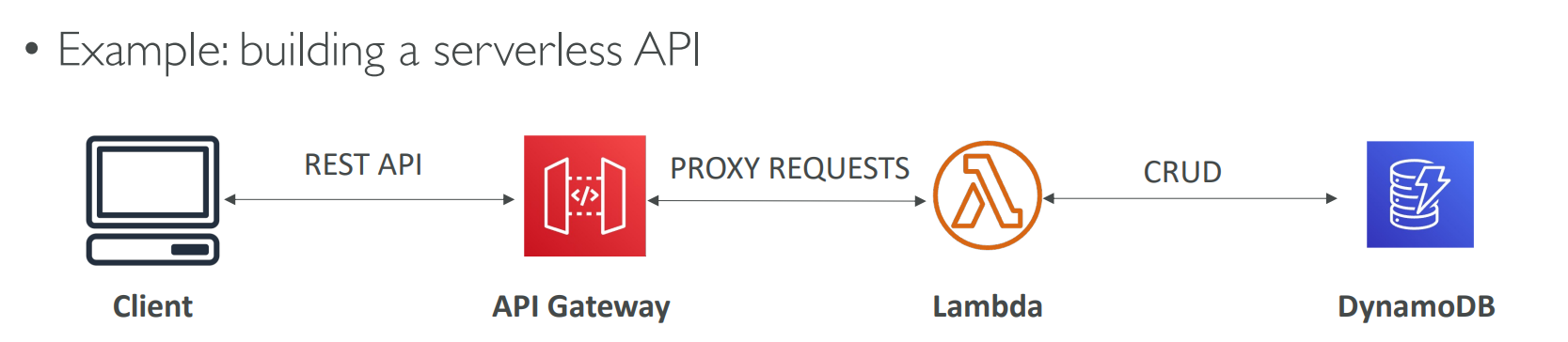
API Gateway acts as a bridge between clients and your AWS backend services helping you create, manage, and secure APIs easily in a serverless way.
🧱 Use Case: Building a Serverless HTTP API
When building a serverless application, you can integrate:
- AWS Lambda – to execute backend logic.
- Amazon DynamoDB – to store and manage data.
- Amazon API Gateway – to expose your Lambda functions as RESTful or WebSocket APIs.
This allows external clients (websites, mobile apps, etc.) to securely access your serverless backend.
⚙️ How It Works
- A client sends an HTTP request to the API Gateway.
- The API Gateway routes the request to an AWS Lambda function.
- The Lambda function performs operations (e.g., read, create, update, delete data in DynamoDB).
- The API Gateway returns the response back to the client.
| Feature | Description |
|---|---|
| Serverless and Scalable | Automatically scales to handle any request volume. |
| Multiple API Types | Supports RESTful, HTTP, and WebSocket APIs. |
| Security | Integrates with IAM, Cognito, or custom authorizers. |
| API Throttling & Caching | Helps control usage and improve performance. |
| Monitoring | Built-in integration with CloudWatch for metrics and logs. |
| Integration Options | Works with Lambda, EC2, ECS, or any HTTP endpoint. |
🧩 Exam Tip
When you see a question about creating a serverless API, think API Gateway + Lambda.
☁️ 02. AWS Batch Overview
AWS Batch is a fully managed batch processing service that enables you to run batch computing workloads at any scale.
It automatically provisions the right compute resources (EC2 or Spot Instances) to efficiently execute your jobs.
🧱 What is a Batch Job?
A batch job is a job that:
- Has a start and an end time (e.g., starts at 1 AM, ends at 3 AM).
- Is not continuous like streaming jobs.
- Can handle large-scale compute workloads such as image processing, machine learning, and data transformations.
⚙️ How AWS Batch Works
- Submit Jobs → You define your batch jobs as Docker images and submit them to a batch queue.
- Dynamic Provisioning → AWS Batch automatically provisions the right number of EC2 instances or Spot Instances.
- Execution on ECS → Your Docker containers run on an ECS-managed compute environment.
- Output Handling → Processed data (e.g., images) can be stored back in Amazon S3 or another destination.
🧩 Example Use Case
Scenario:
You want to process user-uploaded images stored in Amazon S3.
Workflow:
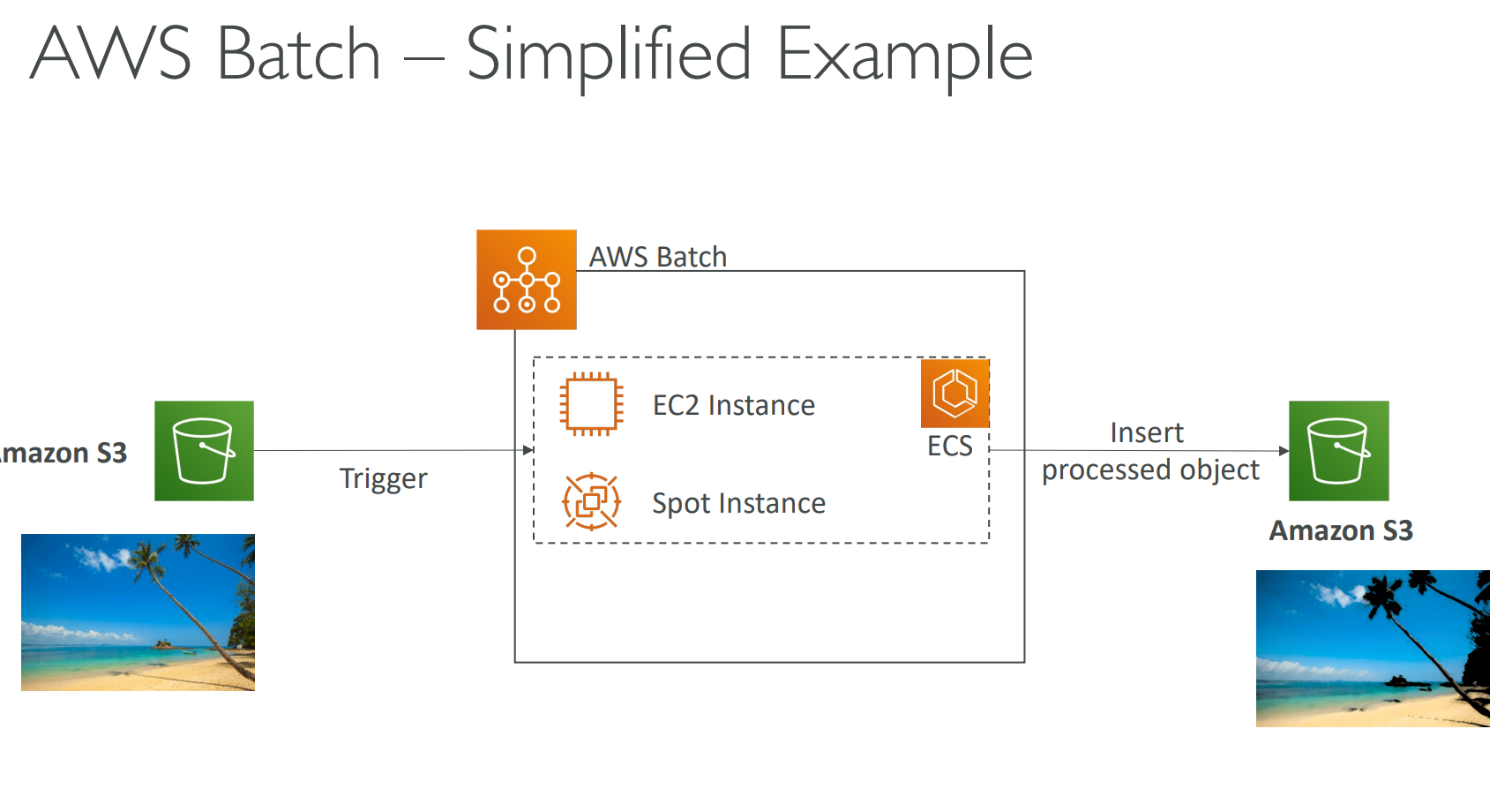
- Images are uploaded to an S3 bucket.
- The upload triggers an AWS Batch job.
- AWS Batch provisions EC2 or Spot Instances.
- Docker containers process the images (e.g., apply filters).
- Processed images are saved to another S3 bucket.
Diagram (Conceptual Placeholder)
S3 (Raw Images) → AWS Batch (Compute Env: EC2/Spot) → ECS Tasks → S3 (Processed Images)
🧠AWS Batch Key Features
| Feature | Description |
|---|---|
| Fully managed | AWS handles instance provisioning, scaling, and scheduling |
| High scalability | Run hundreds of thousands of jobs |
| Flexible environment | Supports EC2 and Spot Instances |
| ECS integration | Jobs defined as Docker containers running on ECS |
| Cost-efficient | Uses Spot Instances and automatic scaling for optimization |
⚔️AWS Batch vs AWS Lambda
| Feature | AWS Batch | AWS Lambda |
|---|---|---|
| Purpose | Batch processing | Event-driven functions |
| Execution Duration | No time limit | Max 15 minutes |
| Compute Type | EC2 / Spot Instances / Fargate | Fully serverless |
| Language Support | Any (via Docker) | Limited (Node.js, Python, Java, etc.) |
| Disk Space | EC2 storage (EBS, Instance Store) | Limited temporary space |
| Scaling | Managed scaling | Automatic scaling |
| Use Case | Long-running compute-heavy jobs | Lightweight, short-lived tasks |
✅ Summary
- AWS Batch automates provisioning and scaling for batch workloads.
- It uses ECS and Docker under the hood.
- It’s ideal for large-scale, long-duration, or compute-heavy jobs.
- Unlike Lambda, Batch is not serverless, but it’s fully managed by AWS.
📘 Example Exam Tip:
If you see a question about running a large machine learning job that runs for hours, the answer is AWS Batch, not Lambda.
💡 Amazon Lightsail
Amazon Lightsail is a simplified AWS service for running virtual servers, storage, databases, and networking with low, predictable pricing — ideal for beginners.
⚙️ Key Features
- Launch virtual servers with prebuilt templates (LAMP, Node.js, WordPress, etc.)
- Includes SSD storage, managed databases, and DNS management
- Simple pricing and easy setup
- Basic monitoring and email notifications
🚀 Use Cases
- Simple web apps and websites (WordPress, Magento, Joomla)
- Development / testing environments
- Small business hosting
⚔️ Lightsail vs EC2
| Feature | Lightsail | EC2 |
|---|---|---|
| Ease of use | ✅ Very simple | ⚙️ Complex |
| Pricing | 💰 Fixed monthly | 💵 Variable (pay-per-use) |
| Scaling | ❌ Manual only | ✅ Auto-scaling |
| Integration | 🔸 Limited | ✅ Full AWS integration |
⚠️ Limitations
- No auto-scaling
- Limited AWS service connections
- Less customization
✅ Best for: Beginners or small workloads needing simple, low-cost cloud hosting.
❌ Not for: Complex, scalable, enterprise-grade architectures.