07. AWS Systems Manager (SSM)
AWS Systems Manager (SSM) is a hybrid management service that helps you manage both AWS EC2 instances and on-premises servers at scale. It provides operational insights, automation, configuration management, and patching capabilities — all from a centralized console.
SSM is a hybrid AWS service, meaning it works across:
- AWS resources (e.g., EC2, RDS)
- On-premises servers or virtual machines
It allows administrators to manage mixed environments seamlessly.
⚙️ Core Capabilities
| Feature | Description |
|---|---|
| Run Command | Execute shell or PowerShell commands across multiple instances simultaneously. |
| Patch Manager | Automate patching for OS and software across EC2 and on-premises servers. |
| Parameter Store | Securely store configuration data and secrets (e.g., API keys, DB passwords). |
| State Manager | Define and maintain the desired state of your infrastructure (e.g., configuration consistency). |
| Inventory | Collect metadata from managed instances for visibility and compliance. |
| Automation | Simplify repetitive operational tasks like AMI creation or instance replacement. |
🧠 Exam Tips
- Anytime the exam asks about:
- Patching EC2 or on-premises servers → Think SSM Patch Manager
- Running commands across all instances → Think SSM Run Command
- Storing configurations securely → Think SSM Parameter Store
- Works on Linux, Windows, macOS, and even Raspberry Pi.
- SSM Agent must be installed and running on each system to enable control.
- Amazon Linux 2 and some Ubuntu AMIs come with the agent pre-installed.
🏗️ How It Works
Workflow
- Install SSM Agent on EC2/on-premises servers.
- Agent communicates securely with the SSM service in AWS.
- You manage and automate operations via AWS Console, CLI, or SDK.
- Run commands, patch systems, or enforce configurations remotely.
🔐 02. AWS SSM — Session Manager
Session Manager is a fully managed AWS Systems Manager (SSM) capability that provides secure, auditable, browser-based or CLI-based shell access to your EC2 instances and on-premises servers, without requiring:
- SSH access
- Bastion hosts
- Open inbound ports (e.g., port 22)
- SSH keys or key pairs
✅ Key Benefit: Enhanced security — no open ports, no key management.
⚙️ How It Works
| Component | Description |
|---|---|
| SSM Agent | Installed on the EC2 instance (pre-installed on Amazon Linux 2, Windows 2019+). |
| IAM Role | Grants the EC2 instance permissions to communicate with the SSM service using the AmazonSSMManagedInstanceCore policy. |
| Session Manager | Establishes a secure, encrypted channel between the user and the managed instance via the SSM service — no direct network access required. |
🚀 Steps — Hands-On Demo
1️⃣ Launch EC2 Instance
- Go to EC2 → Launch Instance
- Choose Amazon Linux 2 AMI, instance type t2.micro
- Do not select any key pair
- Disable SSH access → security group allows no inbound rules
- Attach IAM role (see below)
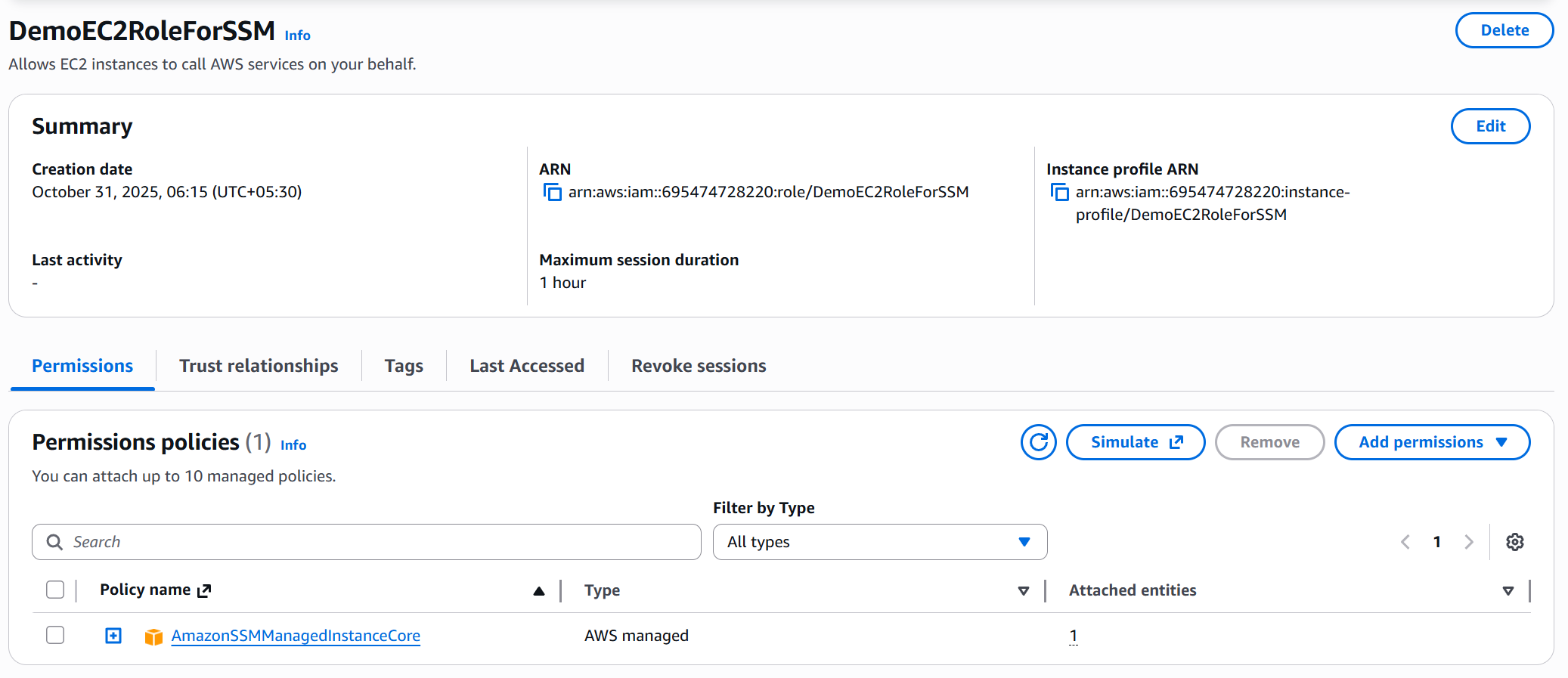
2️⃣ Create IAM Role for SSM Access
- Go to IAM → Roles → Create role
- Choose Trusted Entity:
AWS Service → EC2 - Attach Policy:
AmazonSSMManagedInstanceCore - Name it:
DemoEC2RoleForSSM - Attach this role to the instance before or after launch
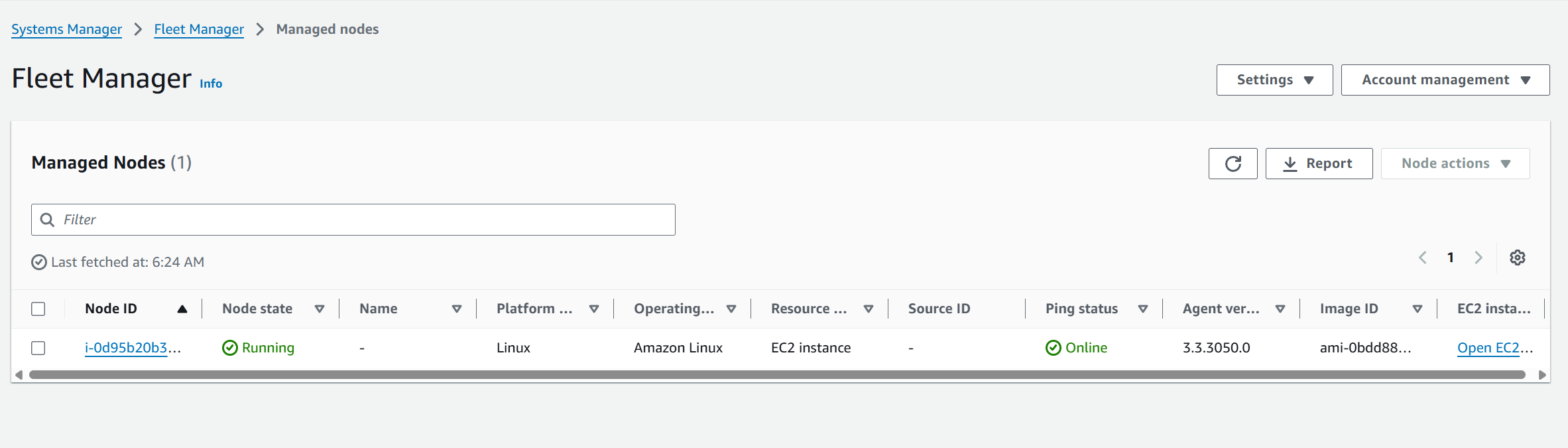
3️⃣ Verify in Fleet Manager
- Go to Systems Manager → Fleet Manager
- Wait for instance to appear as a Managed Node
- Status: ✅ SSM Agent is online
- Platform:
Amazon Linux 2 - Linked EC2 instance ID
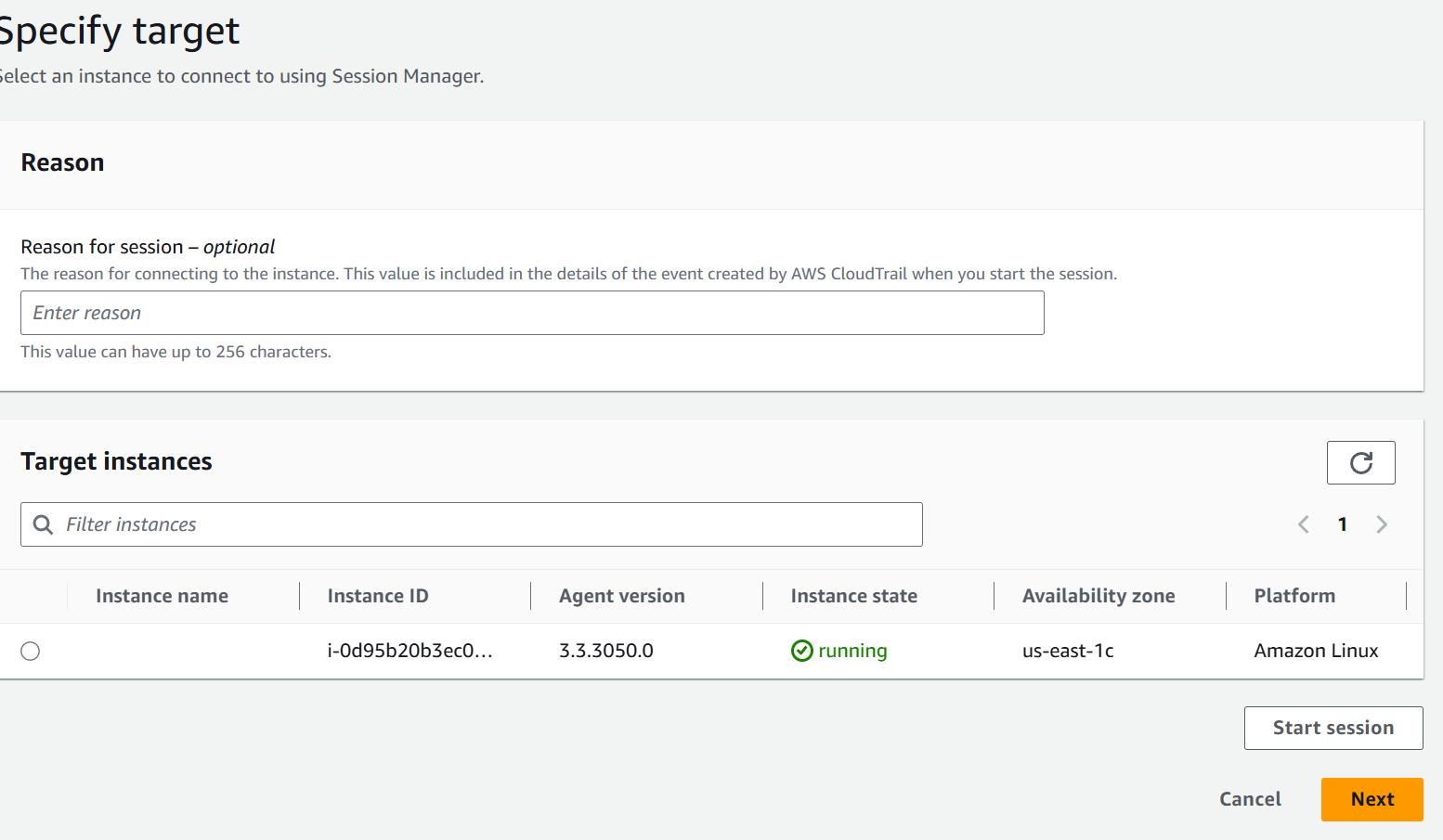
4️⃣ Start a Secure Session
-
Go to Systems Manager → Session Manager
-
Click Start session → Select your EC2 instance → Start session
-
A terminal shell opens (in browser or via CLI)
hostname
ping google.com
⚙️ AWS Systems Manager — Parameter Store
Parameter Store securely stores configuration data and secrets like API keys, passwords, and app settings.
It’s serverless, scalable, versioned, and IAM/KMS-integrated.
🔑 Features
- Store Strings, StringLists, or SecureStrings (KMS-encrypted)
- Version tracking for parameter updates
- IAM access control per parameter or path
- Integrates with EC2, Lambda, ECS, etc.
- No infrastructure to manage
🚀 Create Parameter (Console)
- Go to Systems Manager → Parameter Store → Create parameter
- Name:
/demo/parameter - Type:
StringorSecureString - Value:
my configuration parameter - Click Create parameter
💻 Access (CLI)
# Get parameter
aws ssm get-parameter --name "/demo/parameter"

# Get decrypted secret
aws ssm get-parameter --name "/demo/secure-param" --with-decryption