05. Others
🌐 01. AWS Global Accelerator
AWS Global Accelerator improves global application availability and performance by routing traffic over the AWS private global network instead of the public internet.
| Feature | Description |
|---|---|
| Global Network Routing | Routes user traffic through AWS’s private backbone network. |
| Static Anycast IPs | Provides 2 static IPs that act as a fixed entry point to your application. |
| Improved Latency (up to 60%) | Optimizes the network path to reduce latency for global users. |
| Automatic Failover | Instantly redirects traffic to healthy endpoints in another region. |
| Supports TCP & UDP | Works for non-HTTP applications too (gaming, VoIP, APIs, etc.). |
| Integration with AWS Shield | Protects against DDoS attacks. |
⚙️ Example Scenario
Use Case:
You have an application hosted in Mumbai (ap-south-1) and users from USA, Europe, and Australia want to access it.
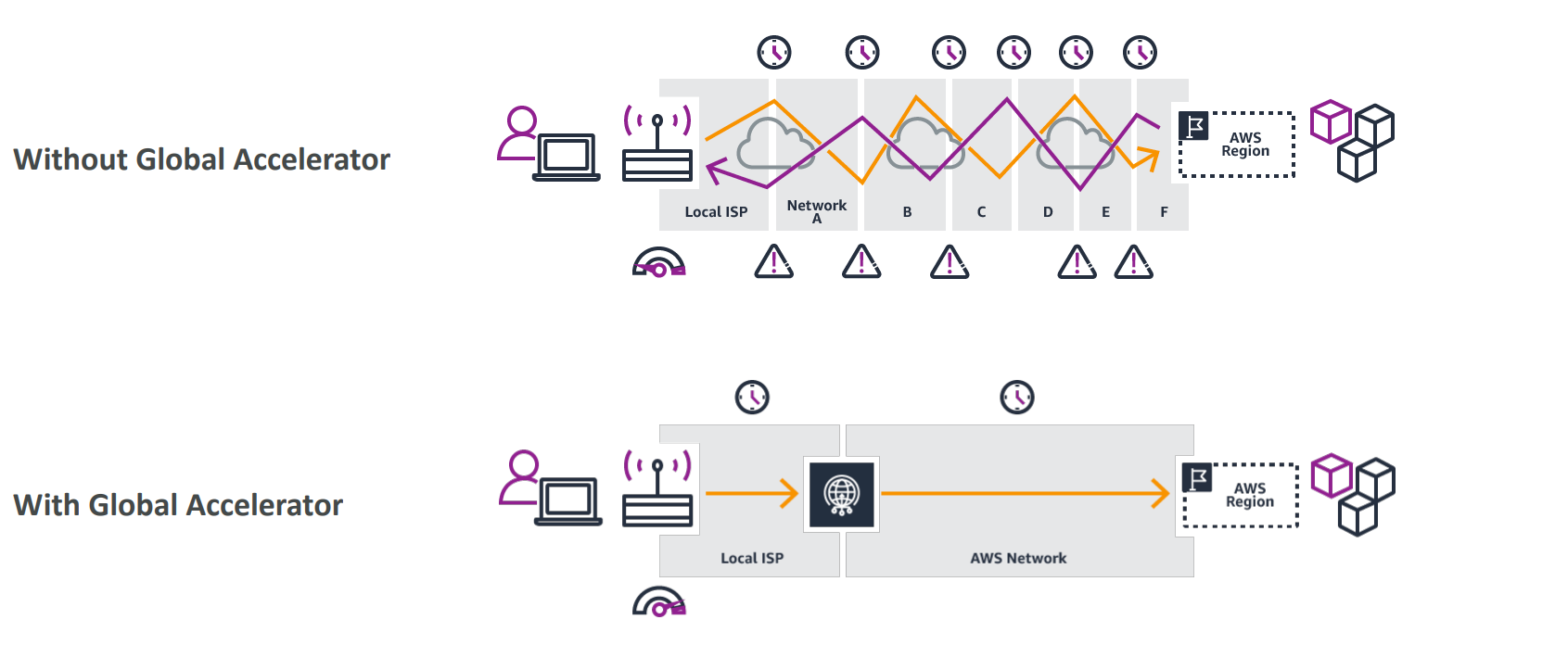
🔸 Without Global Accelerator
- User (USA) → Public Internet → Many hops → Mumbai Server
- High latency and possible packet loss.
- Average latency: ~500 ms
🔹 With Global Accelerator
- User (USA) → Nearest Edge Location (e.g., North Virginia)
- Traffic travels over AWS private network → Mumbai Server
- Reduced latency, fewer hops, better reliability.
- Improved latency: ~300 ms (≈ 40% faster)
⚖️ Global Accelerator vs CloudFront
| Feature | AWS CloudFront | AWS Global Accelerator |
|---|---|---|
| Purpose | Content Delivery Network (CDN) | Network performance optimizer |
| Data Handling | Caches content at the edge | Routes traffic via private network |
| Use Case | Static content (HTML, CSS, images, videos) | Dynamic, interactive apps (APIs, games, web apps) |
| Protocol | HTTP/HTTPS | TCP & UDP |
| Caching | ✅ Yes (content stored at edge) | ❌ No caching (real-time routing) |
| Static IPs | ❌ No | ✅ Yes (2 Anycast IPs) |
| Failover | Limited | ✅ Automatic regional failover |
| Example | Streaming a video from S3 | Accessing a web app or API hosted in EC2 or ALB |
💡 Example Use Cases
| Scenario | Recommended Service | Reason |
|---|---|---|
| Serving static website/images globally | CloudFront | Edge caching for faster delivery |
| Multiplayer game or real-time API | Global Accelerator | Low latency, global performance |
| Streaming video content | CloudFront | Cached delivery |
| SaaS platform with regional redundancy | Global Accelerator | Automatic failover + static IPs |
🧪 Test Tool
You can test Global Accelerator performance using: 👉 https://speedtest.globalaccelerator.aws/
Upload or download a file (e.g., 5 MB) and compare performance:
- Over Public Internet
- Over Global Accelerator
📘 Summary
CloudFront = Cache static content at edge.
Global Accelerator = Route user traffic faster using AWS private backbone.
🧩 Use them together:
- CloudFront for static content delivery
- Global Accelerator for dynamic application traffic optimization
🏢 02. AWS Outposts
AWS Outposts extends AWS infrastructure and services to your on-premises environment, enabling a true hybrid cloud setup.
- Businesses often use both on-prem and cloud systems.
- AWS Outposts brings the same AWS hardware, APIs, and tools to your local data center.
- AWS installs and manages the Outposts Rack; you handle physical security.
| Feature | Description |
|---|---|
| Hybrid Cloud | Run AWS services locally and in the cloud. |
| Low Latency | Process data near users or systems. |
| Fully Managed | AWS handles setup, maintenance, and updates. |
| Consistent Tools | Same console, CLI, and APIs as AWS Cloud. |
🧩 Example
A bank needs sensitive data on-premises but wants AWS compute power.
→ Deploy Outposts racks locally to run EC2, EBS, and RDS with low latency and AWS consistency.
🛡️ Responsibility
| Task | Managed By |
|---|---|
| Hardware, monitoring, updates | AWS |
| Physical security | You |
📘 Summary
AWS Outposts = AWS cloud services on-premises, managed by AWS for a consistent, low-latency hybrid experience.
📶 03. AWS Wavelength
AWS Wavelength brings AWS services to the edge of 5G networks, enabling ultra-low latency applications for mobile and connected devices.
🌐 Overview
- Wavelength Zones are AWS infrastructure deployments within telecom providers’ data centers at the 5G network edge.
- Provides access to AWS compute and storage services (EC2, EBS, VPC, etc.) close to end users.
- Traffic stays inside the CSP network, minimizing latency.
| Feature | Description |
|---|---|
| Edge Deployment | Embedded in 5G provider data centers. |
| Ultra-Low Latency | Ideal for real-time and high-speed mobile applications. |
| Local Processing | Data processed near users without leaving CSP network. |
| AWS Integration | Secure, high-bandwidth link to parent AWS Region. |
| Cost | No extra charges or service agreements. |
🚀 Use Cases
- 🏙️ Smart Cities
- 🤖 ML-assisted Diagnostics
- 🚗 Connected Vehicles
- 🎥 Interactive Live Streaming
- 🕹️ Real-time Gaming
- 🥽 AR/VR Applications
📘 Summary
AWS Wavelength = AWS services at the 5G edge, enabling ultra-low latency apps by processing data closer to users.
⚙️ 04. AWS Local Zones
AWS Local Zones are an extension of an AWS Region that place compute, storage, database, and selected AWS services closer to end users in specific geographic locations — ideal for low-latency applications.
They extend your AWS Region to “local” areas such as Boston, Dallas, Miami, etc., and allow you to run selected AWS resources near your users, while maintaining seamless connection with the parent Region.
| Feature | Description |
|---|---|
| Extension of a Region | Each Local Zone is an extension of an existing AWS Region (e.g., us-east-1 → us-east-1-bos-1a) |
| Low Latency | Run applications that require single-digit millisecond latency closer to end users |
| Supported Services | EC2, EBS, RDS, ECS, ElastiCache, Direct Connect, and more |
| VPC Extension | You can extend your VPC from the parent Region to include Local Zones |
| Managed via Console/CLI | Must be explicitly enabled in the AWS Console under EC2 → Settings → Zones |
| No Additional Agreements | Available to all AWS users — no extra contracts required |
🗺️ Example: US-East-1 (N. Virginia)
| Type | Example Zone Names |
|---|---|
| Availability Zones (AZs) | us-east-1a, us-east-1b, us-east-1c, ... |
| Local Zones | us-east-1-bos-1a (Boston), us-east-1-dfw-1a (Dallas), us-east-1-mia-1a (Miami) |
| Wavelength Zones | Integrated with telecom 5G networks for ultra-low latency apps |
🧱 How It Works
-
Start with a Region
Example:us-east-1 (N. Virginia)with 6 Availability Zones. -
Enable Local Zone
- Go to EC2 Console → Settings → Zones
- Choose a Local Zone Group (e.g., Boston)
- Click Enable
-
Extend Your VPC
- Create a new subnet inside the Local Zone (e.g.,
us-east-1-bos-1a) - Assign a CIDR block (e.g.,
172.31.96.0/20)
- Create a new subnet inside the Local Zone (e.g.,
-
Launch EC2 in Local Zone
- When launching an instance, select your Local Zone subnet (e.g.,
Boston Subnet) - EC2 instance now runs closer to end users in that city
- When launching an instance, select your Local Zone subnet (e.g.,
💡 Use Cases
| Scenario | Example |
|---|---|
| Low-Latency Gaming | Deploy game servers closer to players in Boston or Dallas |
| Media Rendering / VFX | Run compute workloads near artists’ studios |
| Hybrid Workloads | Keep main backend in AWS Region, but latency-sensitive parts in Local Zone |
🧠 Exam Tip
Local Zones extend Regions, not Availability Zones.
They must be explicitly enabled, and are ideal for latency-sensitive workloads that still need seamless access to services in the parent Region.
🖥️ Related AWS Edge Services
| Service | Purpose |
|---|---|
| Local Zones | Bring AWS compute closer to large metro areas |
| Wavelength Zones | Bring AWS compute to 5G networks (with telcos) |
| Outposts | AWS hardware on-premises for hybrid cloud |
| Global Accelerator | Route traffic through AWS edge network for optimal performance |
| CloudFront | CDN caching static content at global edge locations |
✅ Summary
AWS Local Zones = Run selected AWS services closer to end users by extending your VPC into local city zones connected to a parent Region.
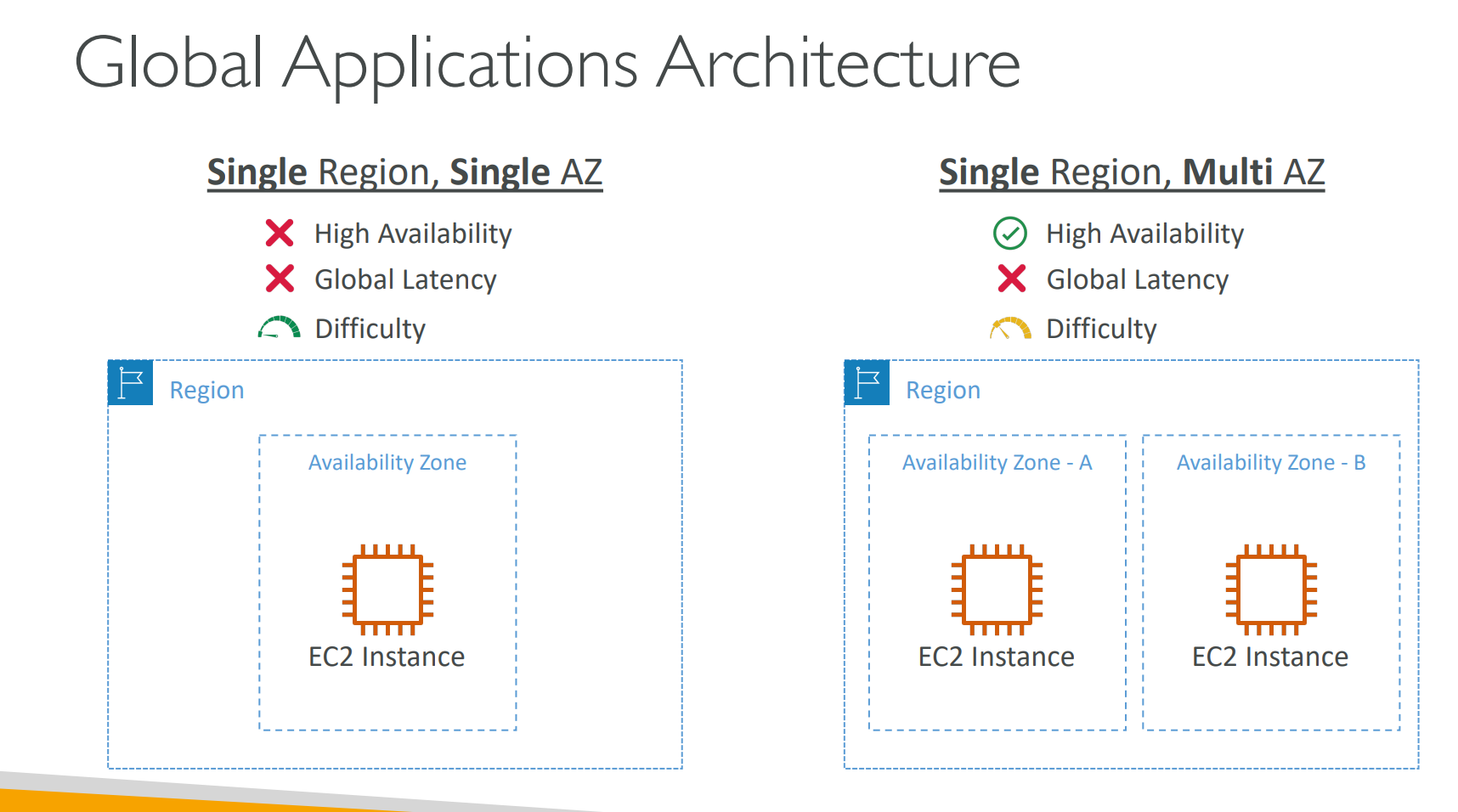
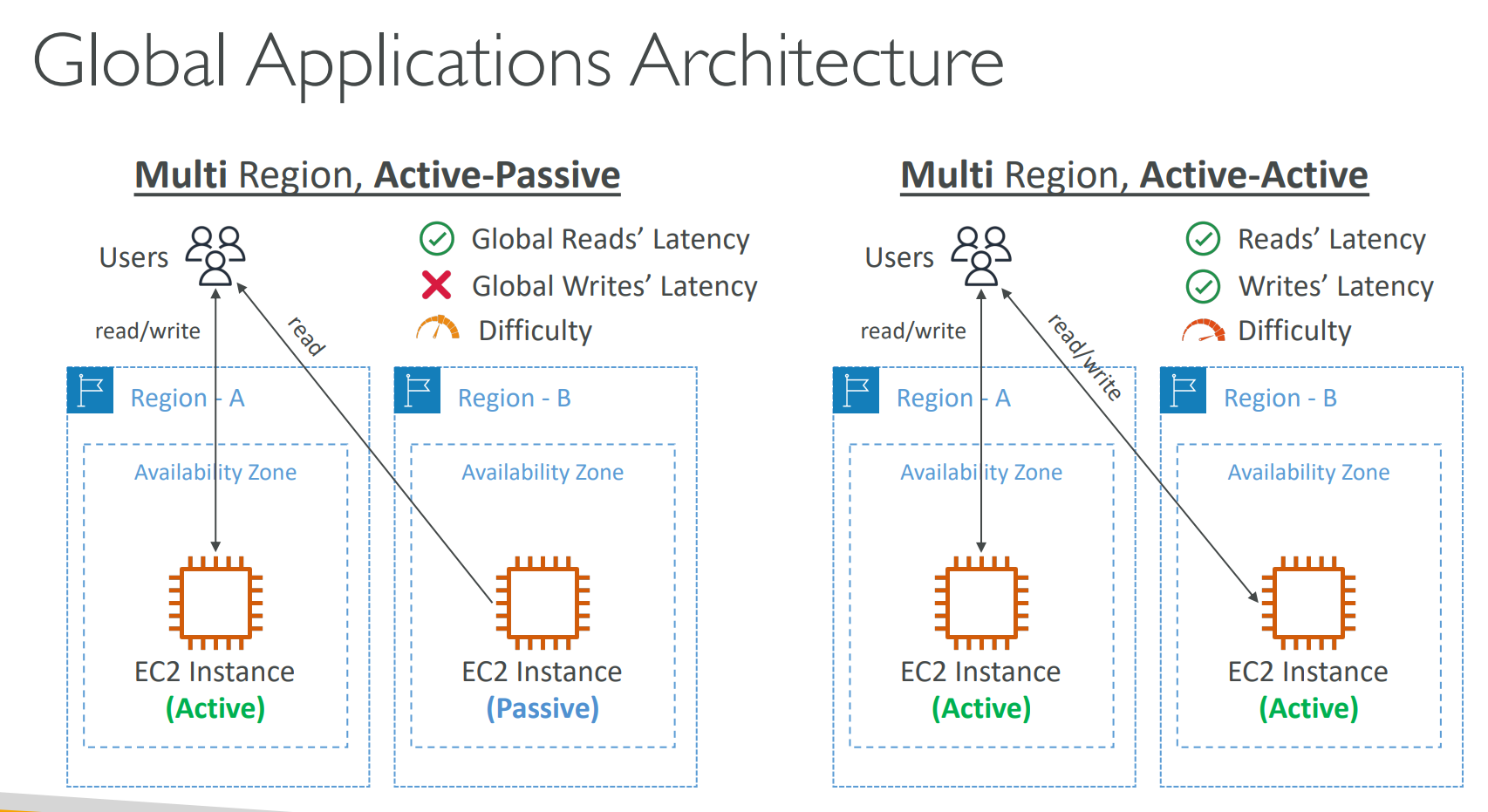
Global Application Architecutre