🧑💻 04. AWS Access Keys
AWS users can access aws services in three main ways:
-
AWS Management Console (protected by password + MFA)
-
AWS Command Line Interface (CLI) (protected by access keys)
-
AWS SDKs (Software Development Kits) (protected by access keys)
-
AWS CloudShell (inbuilt)
⚙️ What’s the AWS CLI?
- A tool that enables you to interact with AWS services using commands in your command-line shell
- Direct access to the public APIs of AWS services
- You can develop scripts to manage your resources
- It’s open-source https://github.com/aws/aws-cli
- Alternative to using AWS Management Console
⚙️ What’s the AWS SDK?
- AWS Software Development Kit (AWS SDK) which contains language-specific APIs (set of libraries)
- Enables you to access and manage AWS services programmatically
- Embedded within your application
- Supports: SDKs (JavaScript, Python, PHP, .NET, Ruby, Java, Go, Node.js, C++) Mobile SDKs (Android, iOS, …) IoT Device SDKs (Embedded C, Arduino, …)
- Example: AWS CLI is built on AWS SDK for Python
🔑 AWS Access Keys
- Access Keys are credentials used for CLI or SDK access.
- Each key consists of:
- Access Key ID → acts like a username
- Secret Access Key → acts like a password
- Security Reminder:
- Users can create, rotate, and delete their own access keys.
⚙️ Managing Access Keys
- Generate keys in the AWS Management Console → IAM → Users → Security Credentials → Create Access Key.
- Users can have up to two active keys at a time for rotation.
- Treat the Secret Access Key like a password — store it securely.
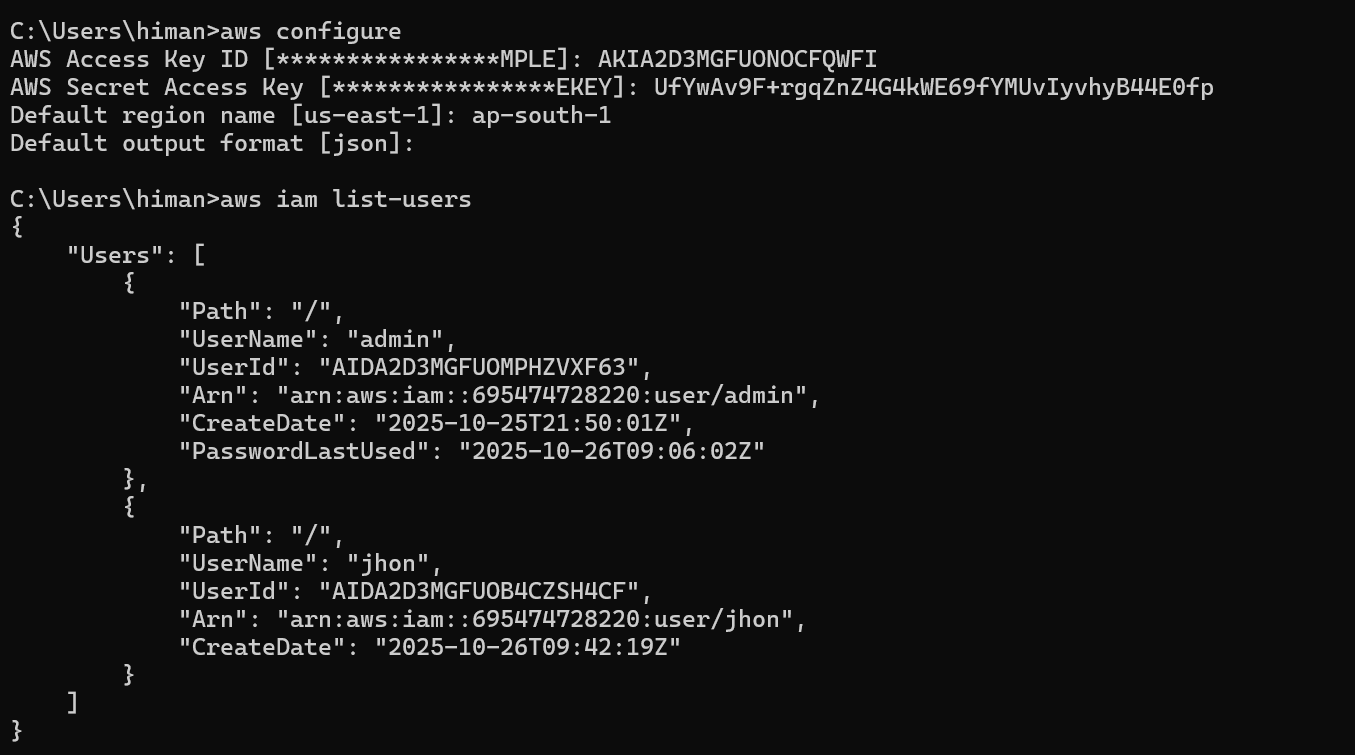
⚙️ Setting up Access Keys in CLI