03. Amazon CloudWatch Events Or Amazon EventBridge
CloudWatch Events evolved into EventBridge — the serverless event bus for AWS, SaaS, and custom applications.
- Amazon CloudWatch Events was the original AWS service for reacting to AWS system changes and scheduling tasks.
- Amazon EventBridge is the next-generation version — a serverless event bus that connects AWS services, SaaS applications, and custom apps.
- Fully backward-compatible: existing CloudWatch Events rules and configurations continue to work in EventBridge.
What is an Event Bus?
An Event Bus is the core component of Amazon EventBridge.
It acts as a central pipeline that receives, filters, and routes events between producers (event sources) and consumers (targets).
🔹 Concept
Think of an Event Bus as a post office for events —
AWS services, SaaS apps, or your own applications send events to it,
and EventBridge routes those events to the right targets (e.g., Lambda, SQS, SNS, Step Functions).
🔹 How It Works
Event Source → Event Bus → Rule → Target
| Step | Description |
|---|
| Event Source | AWS service, SaaS app, or your custom app emitting events. |
| Event Bus | Channel that receives and routes events. |
| Rule | Filters and matches events using patterns. |
| Target | Processes matched events (Lambda, SNS, SQS, etc.). |
🔹 Types of Event Buses
| Type | Description |
|---|
| Default Event Bus | Automatically receives AWS service events (similar to CloudWatch Events). |
| Partner Event Bus | Receives events from external SaaS providers (e.g., Zendesk, Datadog, Auth0). |
| Custom Event Bus | Created by you for custom application or microservice events. |
🧠 Example
- Your app emits an
OrderPlaced event.
- The Custom Event Bus receives it.
- A Rule detects
detailType = "OrderPlaced".
- The Target (Lambda) runs the order fulfillment workflow.
CloudWatch Events
- Delivers system events about changes in AWS resources.
- Example: Trigger a Lambda when an EC2 instance changes state.
Key Concepts
- Schedules (Cron jobs): Create rules that run on a schedule (e.g., hourly Lambda trigger).
- Event Patterns: React to specific AWS API/service actions (e.g., IAM root sign-in).
- Targets: Actions to trigger — Lambda, SNS, SQS, Step Functions, etc.
Amazon EventBridge
- The enhanced version of CloudWatch Events.
- Supports SaaS, custom application, and advanced event processing.
Key Features
| Feature | Description |
|---|
| Multiple Event Buses | Default, Partner, and Custom buses to organize and route events. |
| Schema Registry | Auto-discovers and models event structures. |
| Event Archive | Stores events for compliance or debugging. |
| Event Replay | Reprocesses archived events. |
| Advanced Integrations | Connect AWS services and external systems with flexible rules. |
Feature Comparison
| Feature | CloudWatch Events | EventBridge |
|---|
| Origin | Original AWS event service | Enhanced CloudWatch Events |
| Event Sources | AWS only | AWS + SaaS + Custom Apps |
| Event Bus | Single | Multiple (Default, Partner, Custom) |
| Schema Registry | ❌ | ✅ |
| Event Archive & Replay | ❌ | ✅ |
| Integration Scope | AWS-only | AWS + SaaS |
| Use Case Breadth | AWS-centric | Full event-driven architecture |
Typical Use Cases
| Use Case | Example |
|---|
| Serverless Scheduling | Lambda every hour (cron-style) |
| Security Monitoring | SNS alert on IAM root sign-in |
| System Automation | Trigger EC2 or ECS tasks |
| SaaS Integration | Process Datadog/Zendesk events |
| Custom Applications | Handle custom business events |
Exam Tip
- CloudWatch Events = old name → EventBridge = upgraded version
- EventBridge = serverless event bus for AWS, SaaS, and custom events.
- Key focus areas:
- Event Buses (Default, Partner, Custom)
- Rules (Patterns/Schedules)
- Targets (Lambda, SNS, SQS, Step Functions)
- Schema Registry, Archive, Replay
✅ All CloudWatch Events features still exist — they’re now part of Amazon EventBridge.
🧩 02. Hands-on: Amazon EventBridge — Rules & Scheduler
Learn how to create scheduled and event-driven rules in Amazon EventBridge
using the AWS Management Console.
In this hands-on, you will:
- Create a scheduled rule using EventBridge Scheduler to invoke a Lambda function every hour.
- Create event pattern–based rules to:
- Send SNS notifications when users sign in to AWS Console.
- Notify when EC2 instances are terminated.
⚙️ Task 1: Create an Hourly Lambda Invocation (EventBridge Scheduler)
1️⃣ Open EventBridge Console
- Navigate to AWS Console → EventBridge → Create rule.
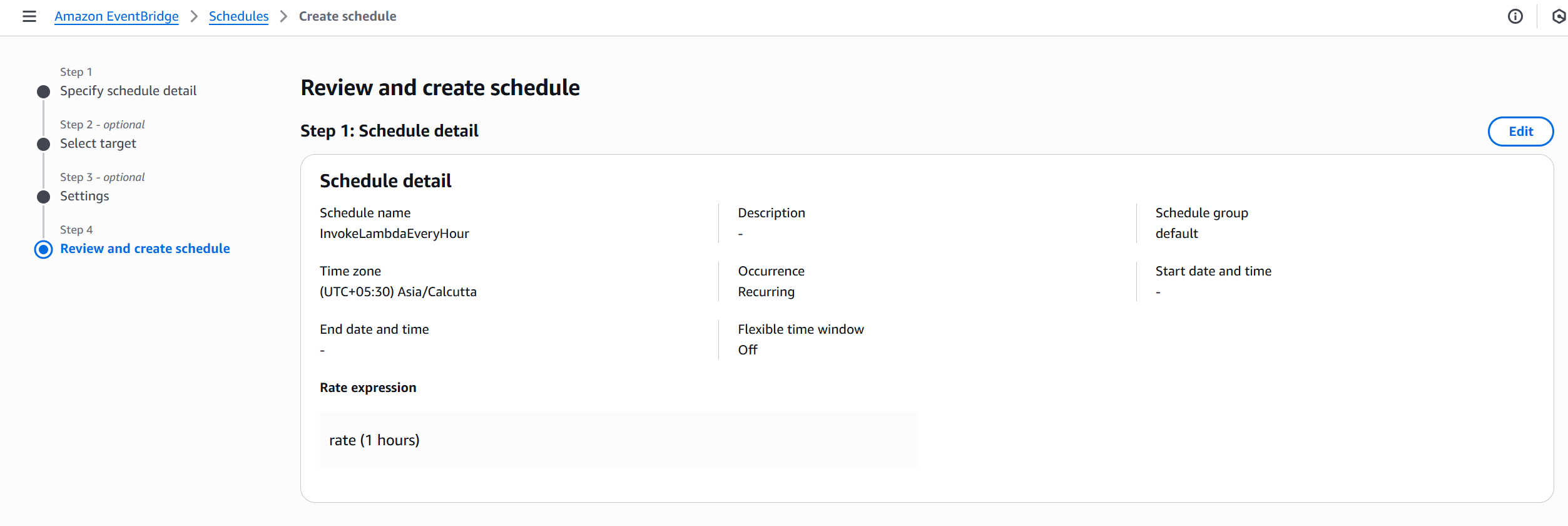
2️⃣ Create Schedule
| Setting | Value |
|---|
| Schedule name | InvokeLambdaEveryHour |
| Schedule type | Recurring schedule |
| Expression type | Rate-based |
| Rate expression | rate(1 hour) |
| Setting | Value |
|---|
| Target type | AWS Lambda function |
| Function name | Select your Lambda (e.g., demoLambda) |
- Leave Flexible time window → Off (executes exactly every hour).
- Leave retry policy and DLQ as default.
4️⃣ Permissions & Creation
- AWS creates an IAM role automatically for EventBridge Scheduler.
- Click Next → Create schedule.
✅ Result:
Your Lambda function is now automatically invoked every hour using the EventBridge Scheduler.
(EventBridge Scheduler is the new recommended way for cron/rate-based tasks.)
⚙️ Task 2: Send Notification on AWS Console Sign-in
1️⃣ Create a Rule
- EventBridge → Rules → Create rule
- Rule name:
SendNotificationForLogin
- Event source:
AWS events
- Event pattern type:
AWS Console Sign-in events
2️⃣ Define Event Pattern
| Field | Value |
|---|
| Service name | AWS Console Sign-in |
| Event type | Sign-in events |
3️⃣ Add Target
| Target Type | Description |
|---|
| SNS Topic | Choose an existing SNS topic (e.g., demo-ccp-topic). |
- Click Next → Next → Create rule.
✅ Result:
Whenever a user signs into the AWS Console, an SNS notification/email is sent automatically.
⚙️ Task 3: Detect EC2 Termination Events
1️⃣ Create a Rule
- EventBridge → Rules → Create rule
- Rule name:
EC2InstanceTerminateNotification
- Event source:
AWS events
2️⃣ Define Event Pattern
| Field | Value |
|---|
| Service name | EC2 |
| Event type | EC2 Instance State-change Notification |
| State filter | "state": ["terminated"] |
3️⃣ Add Target
| Target Type | Description |
|---|
| SNS Topic | Send notification to demo-ccp-topic. |
- Click Next → Create rule.
✅ Result:
When any EC2 instance enters the terminated state, an SNS message is triggered.
🧹 Clean Up
To avoid extra cost or unnecessary triggers:
- Go to EventBridge → Rules → disable or delete the created rules.
- Or, delete the
InvokeLambdaEveryHour schedule.
🧠 Key Learnings
| Concept | Description |
|---|
| EventBridge Scheduler | Modern replacement for cron/rate rules — ideal for time-based invocations. |
| Event Pattern Rules | React to real-time AWS events (e.g., login, EC2 state changes). |
| Targets | Lambda, SNS, SQS, Step Functions, etc. |
| Rules vs Scheduler | Scheduler = time-based, Rule = event-based. |
🧩 Summary
| Rule Name | Type | Trigger | Target |
|---|
InvokeLambdaEveryHour | Schedule | Every 1 hour | Lambda function |
SendNotificationForLogin | Event pattern | AWS Console Sign-in | SNS Topic |
EC2InstanceTerminateNotification | Event pattern | EC2 Termination | SNS Topic |
📝 Exam Tip
- EventBridge Scheduler is the new service dedicated for cron/rate expressions.
- Event Rules handle real-time AWS events.
- Always remember the flow:
👉 Event Source → Event Bus → Rule → Target.