03. AWS RDS & Amazon Aurora
01. AWS RDS
Amazon RDS (Relational Database Service) is a fully managed service for relational databases on AWS.
It allows you to run databases that use SQL as the query language without managing infrastructure.
🧠 Key Features
| Feature | Description |
|---|---|
| Managed Service | AWS handles provisioning, patching, backups, and recovery. |
| Supported Engines | MySQL, PostgreSQL, MariaDB, Oracle, SQL Server. |
| High Availability | Multi-AZ deployments for automatic failover. |
| Scalability | Vertical (instance size) and horizontal (read replicas). |
| Backups | Automated continuous backups with Point-in-Time Restore. |
| Monitoring | CloudWatch metrics and dashboards for performance insight. |
| Storage | Backed by EBS volumes (gp2, gp3, or io1). |
| Access Restriction | No SSH access — AWS fully manages the OS layer. |
🧭 Where RDS Fits in Cloud Architecture
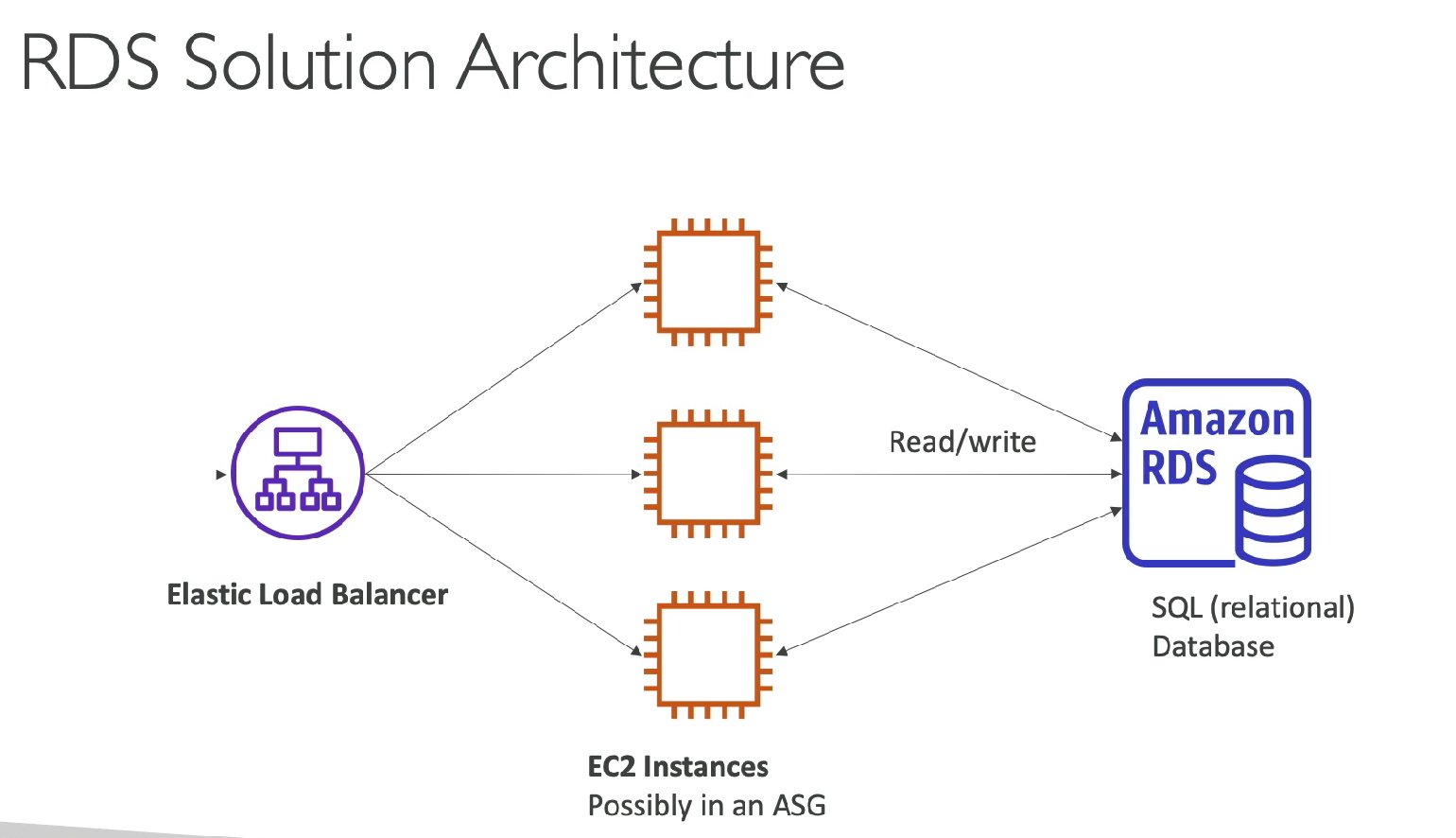
So, when we say “Where RDS fits in architecture,” we’re talking about how RDS is used inside a typical cloud application setup.
Most web applications follow a three-tier structure:
Tier 1 – Load Balancer (Front-end): This is what receives all incoming web traffic from users. The load balancer spreads requests evenly across multiple servers so no single server gets overloaded. Example: AWS Application Load Balancer (ALB).
Tier 2 – EC2 Instances (Application layer): These are the actual servers that run your application code — for example, a website backend, APIs, or business logic. When a user logs in or adds something to a cart, the EC2 instance processes that request and needs to read or save some data.
Tier 3 – RDS Database (Data layer): This is where all the structured data is stored — like users, orders, messages, or payments. Instead of each EC2 server storing data locally, they all connect to the same RDS database so they can share data consistently.
Why Use RDS Instead of a DB on EC2?
| Task | On EC2 | On RDS |
|---|---|---|
| Database installation | Manual | Automated |
| OS patching | Manual | AWS-managed |
| Backups | Manual scripts | Automatic |
| High availability | Custom setup | Multi-AZ |
| Monitoring | Manual CloudWatch setup | Built-in |
| Maintenance | Manual | Scheduled maintenance window |
🗄️ Amazon RDS Deployment Options
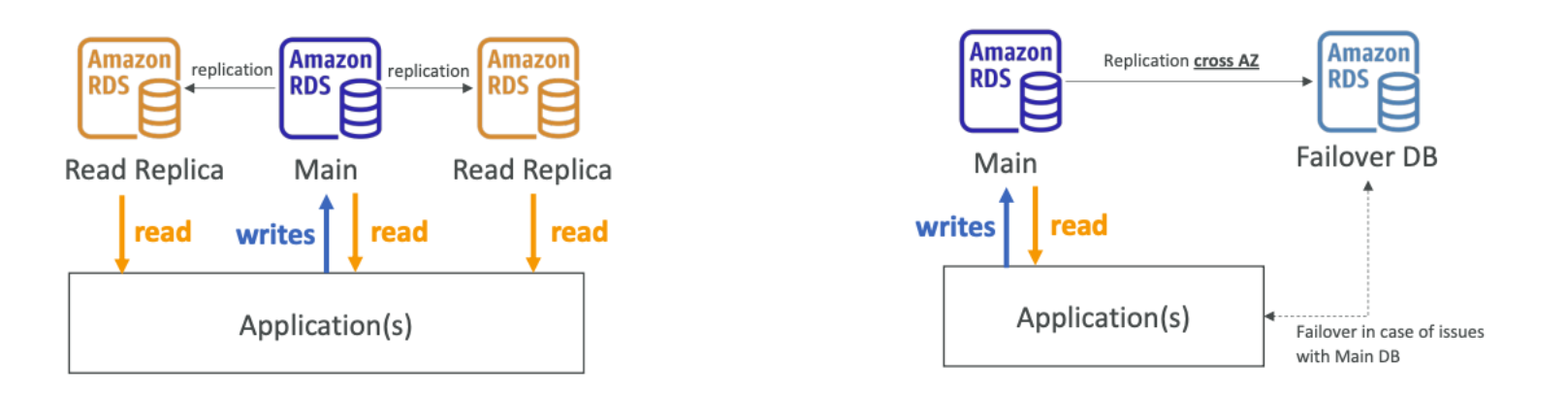
Amazon RDS offers multiple deployment options to balance performance, availability, and cost:
- Read Replicas → Improve read scalability
- Multi-AZ → Provide high availability
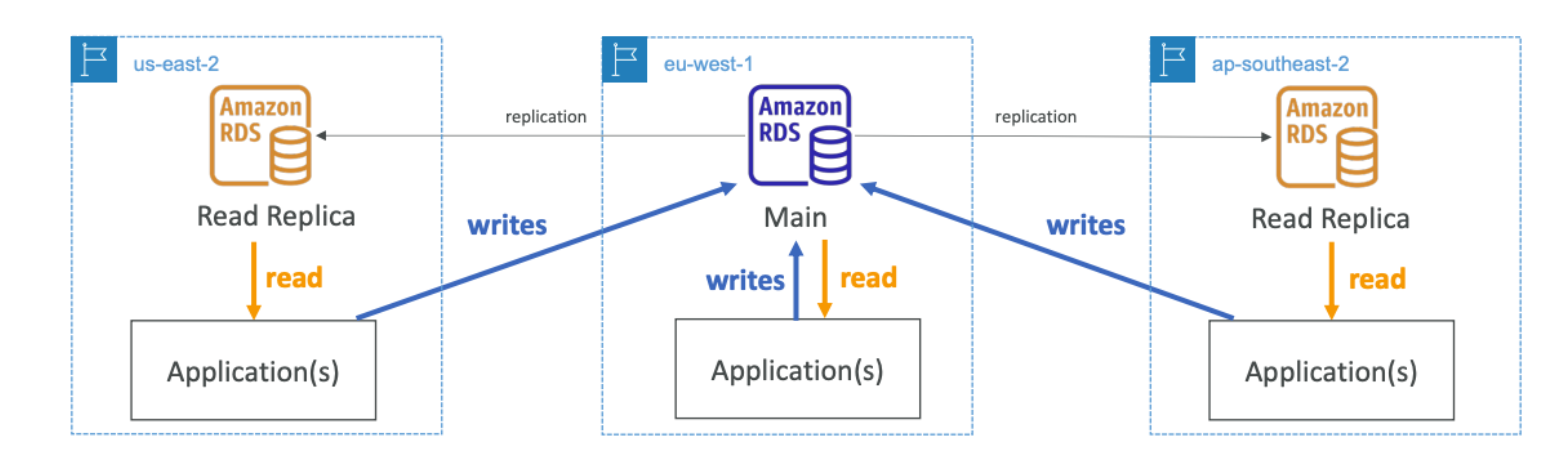
- Multi-Region → Enable global disaster recovery
🔁 1. Read Replicas
- Scale the read workload of db, in other words it allows hr scaling.
- Can create upto 15 Read Replicas.
- Data is only written in main db.
🔁 2. Multi-AZ
- Failover safe in case of AZ outage.
- Data is only read/written to the main database.
- Can only have I other AZ as failover.
🔁 Read Replicas vs Multi-AZ
| Feature | Read Replicas | Multi-AZ |
|---|---|---|
| Purpose | Scale read workload. | Provide failover and availability. |
| Replication Type | Asynchronous. | Synchronous. |
| Data Access | Only read operations allowed. | Main DB handles both reads and writes. |
| Failover Capability | Manual promotion to master if needed. | Automatic failover to standby instance. |
| Number of Replicas | Up to 5 Read Replicas per DB instance. | One standby in another AZ. |
| Use Case | Analytics, reporting, heavy read queries. | Critical production systems needing HA. |
🌍 3. Multi-Region Deployments
Multi-Region (Cross-Region Read Replicas)
| Feature | Description |
|---|---|
| Disaster Recovery | Maintain database availability if a full AWS region fails. |
| Performance | Provide low-latency reads for global users. |
| Replication | Asynchronous across regions (replication lag possible). |
| Cost | Additional charges for inter-region data transfer and replication. |
Summary
- Read Replicas → Improve read performance and scalability.
- Multi-AZ → Ensure high availability and automatic failover.
- Multi-Region → Enable global reach and disaster recovery.
- Choose deployment type based on business continuity, performance, and cost needs.
02. Amazon Aurora
Amazon Aurora is a cloud-optimized, high-performance relational database built by AWS.
It’s compatible with MySQL and PostgreSQL engines.
🚀 Key Benefits
| Feature | Description |
|---|---|
| Performance | Up to 5× faster than MySQL and 3× faster than PostgreSQL on RDS. |
| Scalable Storage | Auto-expands in 10 GB increments up to 128 TB. |
| Replication | Up to 15 read replicas supported. |
| Multi-AZ Support | For fault tolerance and high availability. |
| Fully Managed | No OS or database maintenance required. |
| Cost | ~20% higher than RDS, but more cost-efficient due to performance gains. |
🌀 Aurora Serverless
Aurora Serverless offers on-demand, auto-scaling database capacity.
| Feature | Description |
|---|---|
| Supported Engines | MySQL and PostgreSQL |
| Auto-Scaling | Scales automatically based on workload demand |
| No Capacity Planning | AWS manages compute provisioning |
| Pay per Second | Billing based on actual usage |
| Ideal Use Cases | Infrequent, unpredictable, or variable workloads |
Architecture Concept:
- Clients connect via a proxy fleet.
- Aurora automatically provisions database instances.
- All instances share the same distributed storage layer.
📘 Summary
| Category | RDS | Aurora |
|---|---|---|
| Engine Support | MySQL, PostgreSQL, MariaDB, Oracle, SQL Server | MySQL, PostgreSQL |
| Performance | Standard | 3×–5× faster |
| Storage Scaling | Manual | Auto (10 GB to 128 TB) |
| Pricing | Lower | ~20% higher |
| Read Replicas | Up to 5 | Up to 15 |
| Serverless Option | ❌ | ✅ Available |
| Best For | Traditional managed databases | High-performance cloud-native apps |
🧩 In short:
Use RDS for managed traditional SQL databases.
Use Aurora (or Aurora Serverless) when you need cloud-native performance, scalability, and automation.